AI FinOps on Azure: How to Measure and Optimize the Cost of Models, Tokens, and Agents
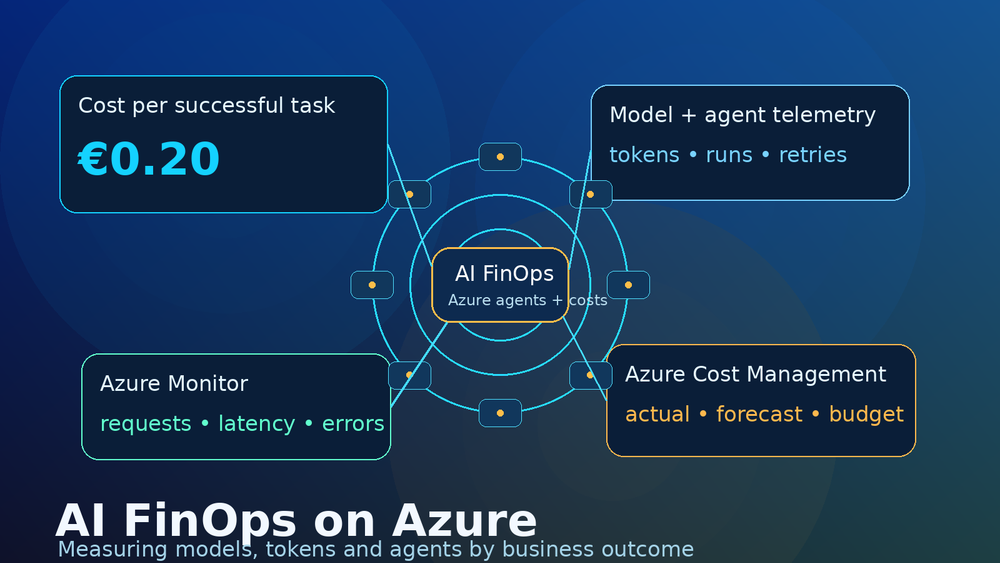
Token cost is only one part of the bill. For AI workloads on Azure, I care more about the cost of a completed task: one useful summary, one finished agent run, one resolved support case, one workflow that did not need a human to repair it afterwards.
The repository for this article is here: github.com/SBajonczak/finops
Why normal cloud cost views are not enough
Traditional Azure cost management is good at answering a familiar question:
Which subscription, resource group, or service generated the cost?
That is still useful. But it is not enough for generative AI systems.
One user action can trigger much more than one model call. A simple "summarize this case" button might do all of this in the background:
- build the prompt
- run retrieval against Azure AI Search or a database
- create or reuse embeddings
- call one or more models
- call tools or internal APIs
- retry after rate limits or bad intermediate results
- run content safety checks
- write traces and audit events
- store logs in Application Insights or Log Analytics
The invoice may show Azure OpenAI, Azure AI Search, Container Apps, API Management, Storage and Log Analytics. The product owner usually wants a different answer:
Did the task complete, did it save time, and what did one useful outcome cost?
That is the reason I do not like looking only at cost per token. It is easy to measure, but it can push you into the wrong optimization.
A cheaper model is not cheaper if it fails more often. A shorter prompt is not cheaper if it removes the context the model needed. Less logging is not cheaper if nobody can explain why an agent loop burned through the budget overnight.
For AI FinOps, the metric I would put near the top is:
cost per successfully completed business task
Not cost per token. Not cost per request. Those are useful signals, but they are not the business result.
What AI FinOps has to answer
For Azure AI workloads, finance data and application behavior do not line up automatically.
Azure Cost Management can tell you what a resource costs. Azure Monitor can show technical usage. The application has to add the missing business context.
At minimum, I want to be able to answer:
- Which application or product created the request?
- Which use case was it?
- Which tenant, cost center, or internal team owns it?
- Which model deployment was used?
- Which agent ran, and how many steps did it take?
- How many retries happened?
- Did the task actually complete?
- Was the result good enough to avoid manual rework?
This is why cost allocation cannot be only a finance report at the end of the month. It has to be part of the application architecture.
If three products share one Azure OpenAI resource, Azure tags on that resource will not tell you which product burned the tokens. The application needs request-level metadata.
Where the money goes
The model is often only part of the workload cost.
For a retrieval augmented generation setup, you pay before the chat model is even called: storage, indexing, chunking, embeddings, refresh jobs and search queries.
For an agent setup, you may pay after the first answer: planning, tool calls, retries, validation, tracing and follow-up model calls.
And then there is observability. Application Insights and Log Analytics are extremely useful, but ingestion and retention are not free. If you trace everything with full payloads, your monitoring bill can become part of the AI cost problem.
So I split the cost picture into three views.
1. List price
List price is the public price for a model or Azure service. It is useful for estimates and architecture discussions.
It is not your invoice.
Prices depend on model version, region, deployment type, input tokens, output tokens, cached tokens, provisioned throughput, serverless options, date, discounts and commercial agreements.
I would not hard-code model prices into business logic. Use official pricing pages for documentation, or retrieve pricing dynamically if you need automation.
2. Technical usage
Technical usage is what the system actually did:
- input tokens
- output tokens
- total tokens
- model requests
- latency
- errors
- retries
- tool calls
- cache hits
- agent steps
Azure Monitor exposes many useful metrics, but metric names and availability vary by resource. A collector should not assume every Azure AI resource exposes exactly InputTokens, OutputTokens, or ModelRequests.
Query what is available and handle missing metrics gracefully.
3. Financial cost
Financial cost comes from Azure Cost Management, cost exports, invoices, actual cost and amortized cost.
This data can lag behind technical telemetry. It can also differ because of rounding, credits, reservations, negotiated pricing, billing windows and shared resources.
In reports, I like to keep the labels honest:
- list price: published price
- estimated cost: modeled projection
- observed usage: tokens, requests, retries, steps
- amortized Azure cost: normalized cost view for commitments
- actual invoiced cost: what billing finally reports
Mixing these up creates arguments nobody enjoys.
Reference architecture
For the reference implementation, I used a simple pattern:
flowchart LR
    User[User or Application] --> Gateway[Azure API Management]
    Gateway --> AI[Azure OpenAI or Microsoft Foundry]
    AI --> Agent[AI Agent]
    Agent --> Tools[Tools and APIs]
    Agent --> Search[Azure AI Search]
    Search --> Data[Storage and Databases]
    Gateway --> AppInsights[Application Insights]
    AI --> Monitor[Azure Monitor]
    Agent --> AppInsights
    CostManagement[Azure Cost Management] --> Collector[AI FinOps Collector]
    Monitor --> Collector
    AppInsights --> Collector
    Collector --> Dashboard[Grafana, Power BI or Azure Workbook]
    Collector --> Alerts[Budgets and Alerts]
The gateway is useful because it gives you a central place for authentication, quotas, header normalization and logging.
The model endpoint handles inference. Agents coordinate model calls, retrieval and tools. Application Insights captures traces, exceptions, dependency calls and custom events. Azure Monitor provides platform metrics. Azure Cost Management provides the financial view.
The collector joins these signals into snapshots and Prometheus metrics so dashboards can show something meaningful.
The operating model I would use
I would not start with a giant AI FinOps program. Start with one workload, then make the model repeatable.
Discover
Find the AI workloads first.
For each workload, document:
- owner
- application or product
- environment
- model deployment
- Azure resources
- cost center
- business use case
- agent tools
- shared infrastructure
Shared resources matter. One Azure OpenAI account, AI Search service or Log Analytics workspace may support several applications.
Measure
Collect both sides: money and behavior.
Financial data:
- actual cost
- amortized cost
- forecast
- budgets
- cost exports
Technical data:
- input and output tokens
- requests
- retries
- agent steps
- tool calls
- latency
- error rate
- successful outcomes
In the reference API, I expose endpoints like:
/api/costs
/api/token-usage
/api/snapshot
/metrics
Allocate
Allocate cost by useful dimensions, not only by resource group.
For AI systems, I usually want:
application
product
team
environment
tenant
useCase
costCenter
agentName
modelDeployment
success
Start with showback if the organization does not yet trust the numbers. Show teams what they consume. Move to chargeback only when ownership and metadata quality are good enough.
Control
Controls should exist at several layers:
- budgets and forecast alerts
- anomaly alerts
- rate limits
- maximum input and output tokens
- context size limits
- agent step limits
- retry limits
- concurrency limits
- model allowlists
- deployment policies
One important Azure detail: budgets can notify and trigger actions. They do not automatically stop spending by themselves.
If you need a hard stop, implement it in the gateway, application, policy or automation layer.
Optimize
The order matters.
I would optimize like this:
- Remove unnecessary requests.
- Stop agent loops.
- Reduce retries.
- Reduce irrelevant context.
- Limit output length where it makes sense.
- Route simple tasks to cheaper models.
- Cache repeatable work.
- Improve retrieval quality.
- Use batch processing where it fits.
- Compare pay as you go with provisioned throughput.
- Tune observability retention and sampling.
A 20 percent cheaper model does not help if the agent calls it five times more often.
Repeat
AI workloads change quickly. New models, new agents and new retrieval pipelines can change cost behavior overnight.
So AI FinOps should become a regular review, not a one-time dashboard.
Required KPIs
Here is the simple example I use when explaining the topic:
1,000 agent runs
total cost: €120
successful tasks: 600
cost per agent run: €0.12
cost per successful task: €0.20
Now change the model routing. The average run cost drops to €0.09, but successful tasks drop to 300.
1,000 agent runs
total cost: €90
successful tasks: 300
cost per agent run: €0.09
cost per successful task: €0.30
The dashboard looks cheaper per run. The business result is worse.
That is the trap.
Tags and request metadata
Use Azure resource tags for the high level ownership view:
owner
costCenter
environment
application
product
useCase
workloadType
dataClassification
For AI workloads, I would set:
workloadType=ai
But tags are not enough when several applications share one Azure OpenAI or Microsoft Foundry resource.
Add request-level metadata as well:
applicationId
tenantId
costCenter
useCase
agentName
modelDeployment
correlationId
environment
success
Do not log raw personal data, full prompts or confidential documents just to allocate cost. Use pseudonymous identifiers where possible. Keep Prometheus labels low cardinality and non-personal.
Implementation notes from the reference repo
The reference collector is a FastAPI app written for Python 3.12. Locally it can use Azure CLI authentication. In Azure it should use Managed Identity through DefaultAzureCredential.
Authentication
from azure.identity import DefaultAzureCredential
from azure.mgmt.costmanagement import CostManagementClient
from azure.monitor.query import MetricsQueryClient

credential = DefaultAzureCredential()
cost_client = CostManagementClient(credential)
metrics_client = MetricsQueryClient(credential)
Querying Azure Cost Management
The collector uses the Azure Cost Management Query API through the official SDK. It requests ActualCost for a custom period and can group by dimensions such as ServiceName.
def query_actual_cost(self, *, scope: str, start: datetime, end: datetime, group_by: str | None):
    grouping = [QueryGrouping(type="Dimension", name=group_by)] if group_by else None
    definition = QueryDefinition(
        type="ActualCost",
        timeframe="Custom",
        time_period=QueryTimePeriod(from_property=start, to=end),
        dataset=QueryDataset(
            granularity="None",
            aggregation={"totalCost": QueryAggregation(name="PreTaxCost", function="Sum")},
            grouping=grouping,
        ),
    )
    return self.client.query.usage(scope=scope, parameters=definition)
The implementation should not invent cost data. If the API is unavailable or the identity lacks permissions, return a clear error.
Querying Azure Monitor
Metric names are configurable:
FINOPS_METRIC_NAMES=InputTokens,OutputTokens,GeneratedTokens,ProcessedPromptTokens,TotalTokens,ModelRequests
The collector queries metrics independently so one missing optional metric does not break the entire snapshot.
for metric_name in metric_names:
    result = self.client.query_resource(
        resource_id,
        metric_names=[metric_name],
        timespan=(start, end),
        granularity=interval,
        aggregations=[MetricAggregationType.TOTAL],
    )
To inspect available metrics for a resource:
az monitor metrics list-definitions --resource "<azure-ai-resource-id>" --output table
Cost per successful task
def calculate_business_task_cost(stats: BusinessTaskStats) -> BusinessTaskCost:
    per_run = stats.total_cost / stats.agent_runs if stats.agent_runs > 0 else None
    per_success = stats.total_cost / stats.successful_tasks if stats.successful_tasks > 0 else None
    return BusinessTaskCost(cost_per_agent_run=per_run, cost_per_successful_task=per_success)
Prometheus metrics
The /metrics endpoint exposes metrics like:
azure_ai_finops_actual_cost
azure_ai_finops_input_tokens_total
azure_ai_finops_output_tokens_total
azure_ai_finops_model_requests_total
azure_ai_finops_cost_per_request
azure_ai_finops_cost_per_successful_task
For labels, use hashes for scopes and resources where needed. Avoid personal identifiers.
Budget deployment with Bicep
resource budget 'Microsoft.Consumption/budgets@2024-08-01' = {
  name: budgetName
  properties: {
    category: 'Cost'
    amount: amount
    timeGrain: 'Monthly'
    timePeriod: {
      startDate: startDate
    }
    notifications: {
      threshold80: {
        enabled: true
        operator: 'GreaterThanOrEqualTo'
        threshold: 80
        thresholdType: 'Actual'
        contactEmails: [
          contactEmail
        ]
      }
    }
  }
}
Again: budgets notify or trigger actions. They are not hard spending limits.
Security and privacy
Use Managed Identity in Azure. Use DefaultAzureCredential locally. Do not build the normal deployment path around client secrets.
Assign the smallest permissions that work. Monitoring Reader for metrics and Cost Management Reader for cost data are usually the kind of roles to start with. Keep deployment permissions separate from runtime permissions.
For allocation, do not store raw prompts, confidential documents or full model responses. Store the metadata needed to understand cost and reliability:
- correlation ID
- application ID
- cost center
- use case
- model deployment
- success flag
- retry count
- latency
If user or tenant grouping is required, pseudonymize identifiers and keep them out of Prometheus labels.
My take
AI FinOps on Azure is not a token dashboard.
It is the connection between financial cost, technical telemetry, ownership and business outcome. If that connection is missing, teams will optimize whatever is easiest to measure. Usually tokens. Sometimes requests. Rarely the actual result.
I would start with inventory and tags, then add request-level metadata. Query Azure Cost Management for the money view. Query Azure Monitor and application telemetry for usage and behavior. Track retries, agent steps, tool failures, cache hit rate, latency and success.
Then optimize the workflow before optimizing the model price.
Because if you only measure cost per token, you will eventually make a cheap system that fails expensively.
References
- Microsoft Learn: Azure Cost Management Query Usage REST API, 2025-03-01: https://learn.microsoft.com/en-us/rest/api/cost-management/query/usage?view=rest-cost-management-2025-03-01
- Microsoft Learn: Create and manage budgets in Microsoft Cost Management: https://learn.microsoft.com/en-us/azure/cost-management-billing/costs/tutorial-acm-create-budgets
- Microsoft Learn: Microsoft.Consumption/budgets Bicep reference: https://learn.microsoft.com/en-us/azure/templates/microsoft.consumption/budgets