SEO and GEO: best practices for being found in search and cited by AI
AI search did not kill SEO. At least not in the way many LinkedIn posts make it sound.
The real problem is simpler: if Google, Bing, ChatGPT Search, Perplexity, or Copilot cannot understand what your page is about, they will either ignore it or summarize it badly. For a small technical blog like mine, that matters. I do not have a content team. I need every useful article to be crawlable, understandable, and quotable.
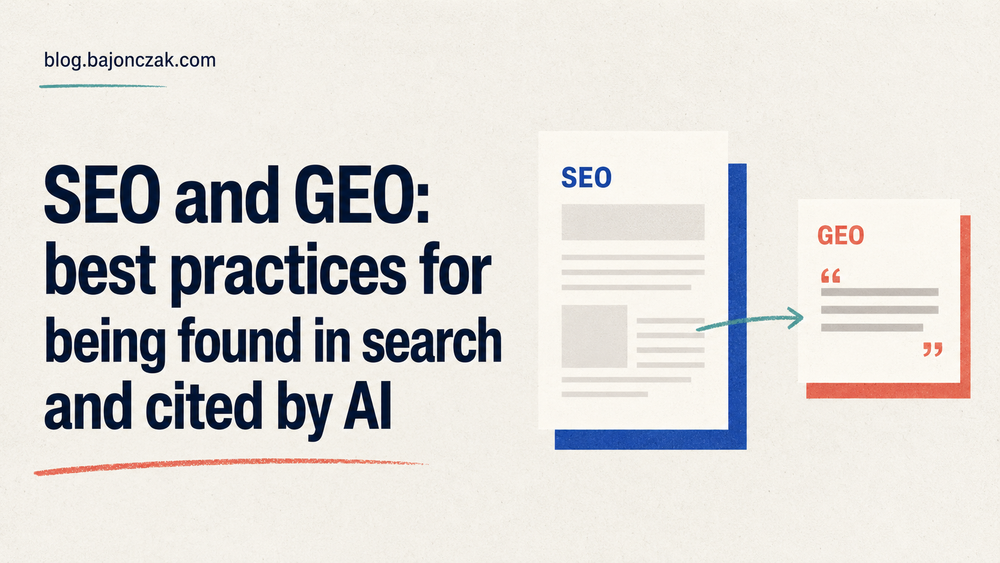
GEO, short for Generative Engine Optimization, adds a second job: make the same content usable as evidence inside generated answers. The click is no longer the only win. Sometimes the win is being named as the source behind the answer, and sometimes that citation is the first time a reader sees your name.
SEO and GEO in one sentence
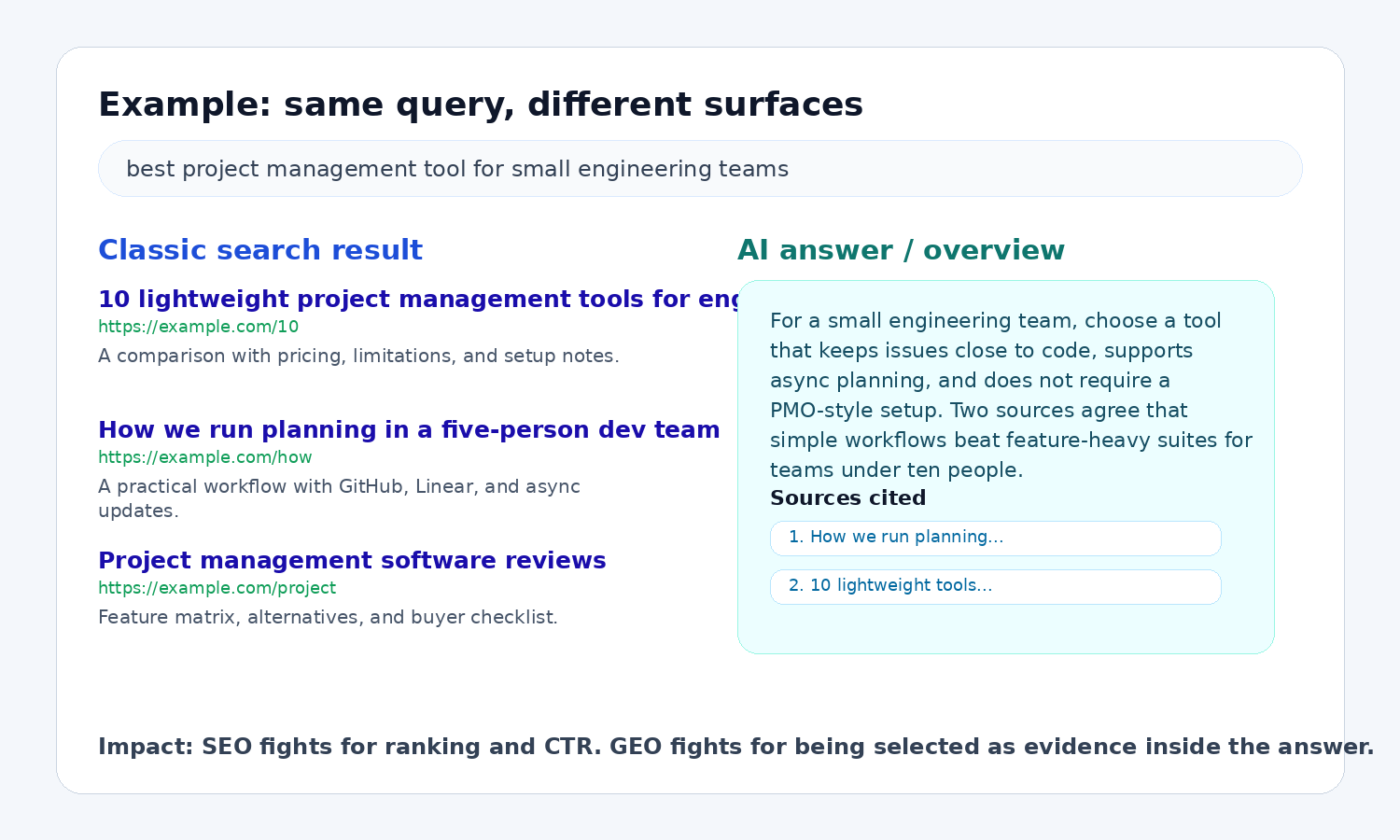
SEO is still the part that gets the page discovered. GEO is the part that makes sure an answer engine can use the page without guessing.
That difference sounds small until you look at the user journey. A classic search result page asks the user to choose a blue link. An AI answer often gives the user a first draft of the answer immediately, then shows citations or source cards. If your page is not structured well enough to be extracted, it may still rank somewhere, but it will be less likely to shape the generated answer.
What good SEO still requires
The boring SEO work did not become obsolete. If anything, AI search makes the basics less negotiable. I know that sounds unexciting, but most visibility problems still start with crawling, intent, weak structure, or content that says too much without answering the question.
1. Make pages crawlable and indexable
Search engines and AI search systems cannot cite what they cannot fetch. Check the basics before writing another content calendar:
- important pages return
200, not soft404or redirect chains - canonical tags point to the real canonical URL
- XML sitemaps include the pages you care about
- robots.txt does not block useful content by accident
- JavaScript does not hide the main content from crawlers
A comparison article blocked by robots.txt may still get shared on social media, but it will not reliably appear in search or AI citations. At that point you have written something useful and then told the machines not to read it.
2. Match intent, not just keywords
Classic keyword targeting often stops at "what phrase has volume?" Better SEO asks what the searcher wants to do next.
For example, the keyword "SharePoint eSignature" can mean several things:
- "What is it?"
- "How do I enable it?"
- "What does it cost?"
- "How does it compare with Adobe Sign?"
- "Why does it not work in my tenant?"
Those should not all be one giant article. They are different intents. A hub page can introduce the topic, then link to specific pages for setup, licensing, comparison, and troubleshooting.
Splitting intent cleanly usually improves internal links, snippet relevance, and conversion. It also gives AI systems sharper source material: a troubleshooting answer can cite the troubleshooting page instead of pulling weak advice from a generic overview.
3. Put the answer near the top
A useful page does not make the reader wait six paragraphs for the answer. Start with the practical conclusion, then add detail.
Bad opening:
In today's digital landscape, search visibility is a crucial factor for business success.
Better opening:
GEO does not replace SEO. It extends it. You still need crawlable, helpful pages, but you also need content that AI systems can quote, verify, and connect to named entities.
Direct openings work better for featured snippets, AI summaries, and impatient humans. I am very much in that last group.
4. Use structured data where it fits
Structured data does not magically rank a weak page. It does help machines understand what a page represents.
Useful schema types for many blogs and business sites include:
ArticleorBlogPostingfor editorial contentFAQPagewhere the FAQ is visible on the page and genuinely usefulHowTowhere the page contains real step-by-step instructionsProduct,Review, orOfferfor ecommerce pages where the markup matches the visible contentOrganizationandPersonto clarify the publisher and author
If an article has author, publication date, headline, image, and FAQ markup, search engines get cleaner machine-readable context. AI systems still judge the text itself, but at least they have fewer reasons to guess who wrote it and what the page is about.
5. Build topical authority with internal links
One article rarely proves expertise. A cluster does.
A practical structure:
- hub page: "Microsoft 365 eSignature guide"
- support page: setup instructions
- support page: licensing and limitations
- support page: comparison with Adobe Sign and DocuSign
- support page: troubleshooting
- support page: governance and audit trail
The hub captures broad intent. The support pages capture specific intent. Internal links tell search engines which page owns which question, and AI answer engines get a cleaner map instead of one overstuffed article trying to do everything.
6. Show real experience
Generic text is cheap now. Experience is harder to fake, and this is where small sites can still compete. A short post with real screenshots and one honest caveat is often more useful than a polished 2,000-word overview that could have been written without opening the product.
Use screenshots, configuration notes, before-and-after examples, limitations, failed attempts, pricing caveats, test data, and real decision criteria. If you have not tested something, say so. If you have tested it, show what you saw.
A hands-on setup guide with screenshots and exact error messages is more useful than another generic "benefits of X" article. It is also easier to cite because it contains specific, attributable evidence.
What GEO adds on top
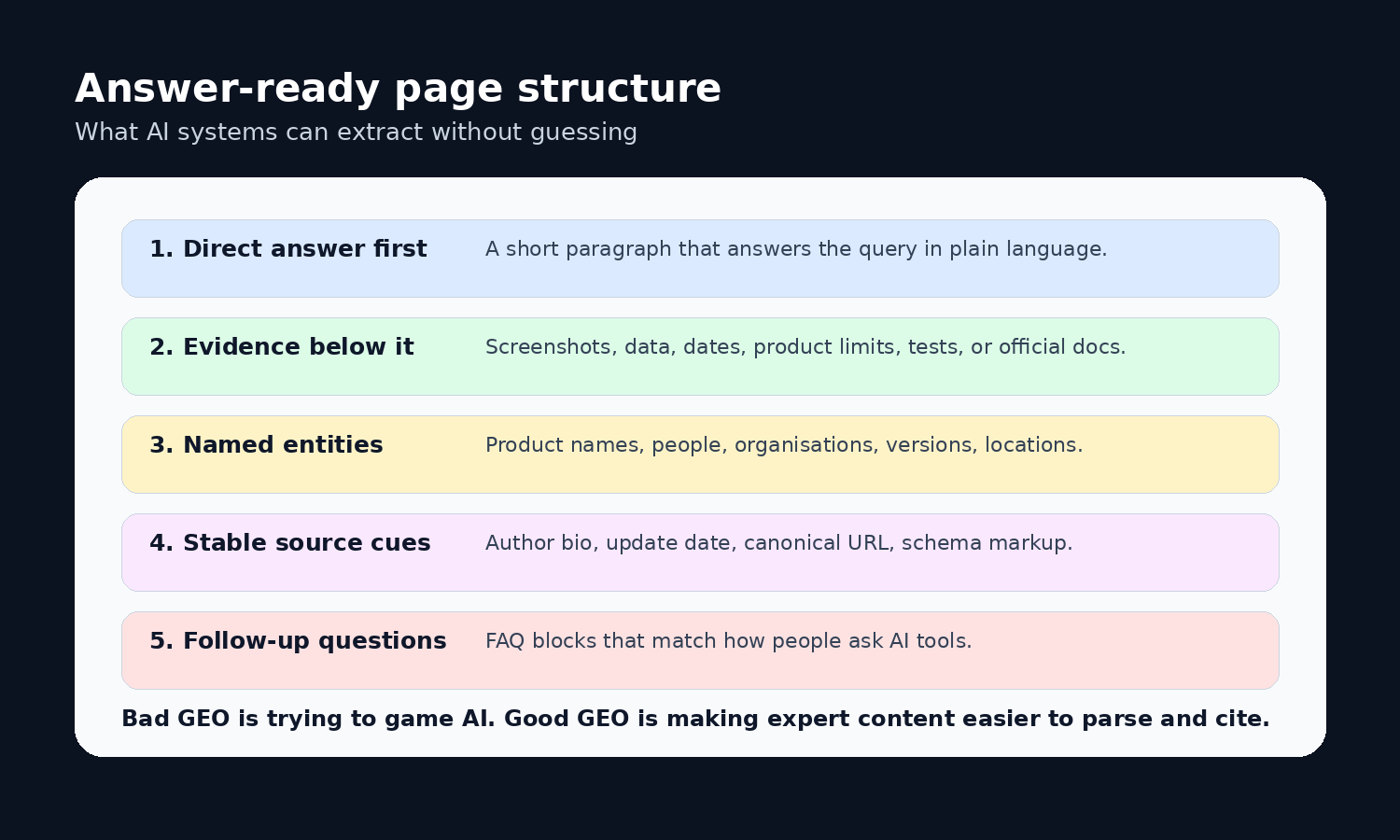
GEO is not a bag of tricks for fooling AI. The useful version is simpler: write and structure content so answer engines can extract the right facts without flattening the meaning.
1. Write answer blocks
Add compact answer blocks under important headings. A good answer block is two to four sentences and can stand on its own.
Example:
GEO is the practice of making content easier for generative answer engines to understand, summarize, and cite. It builds on SEO basics such as crawlability, helpful content, structured data, and authority. The extra work is in clarity: direct answers, named entities, evidence, citations, and content sections that map to real questions.
Answer blocks make extraction less messy. Without them, an AI system may stitch together a summary from scattered paragraphs and lose the nuance you actually cared about.
2. Make entities explicit
AI systems reason heavily over entities: products, people, companies, locations, standards, dates, tools, and relationships between them.
Weak phrasing:
The tool can be connected to the system for automation.
Better phrasing:
Microsoft Power Automate can connect SharePoint document libraries with Microsoft 365 eSignature workflows, subject to tenant availability and licensing.
Explicit entities make your content easier to match with a user's question. They also reduce the chance that an AI summary turns "the tool" and "the system" into the wrong products.
3. Add evidence that can be cited
AI answers are more useful when they can point back to proof. Give them proof.
Good evidence includes:
- screenshots of settings, reports, or search results
- tables with dates, limits, prices, or feature differences
- examples with inputs and outputs
- links to official documentation
- clearly labelled opinions separated from facts
Concrete evidence gives the page something worth citing. It also helps when users click through, because the page has substance beyond the answer summary.
4. Cover follow-up questions
People ask AI tools conversational questions. Your page should answer the follow-ups a human would naturally ask.
For this article, the follow-ups are obvious:
- Is GEO replacing SEO?
- Do I need a separate GEO strategy?
- Should I allow AI crawlers?
- Does schema markup help with AI answers?
- How do I measure GEO impact?
A short FAQ section is not just an SEO trick. It is a map of the conversation around the topic.
Follow-up sections help long-tail search, internal site search, and AI extraction. More importantly, they match how people actually research: one answer usually creates the next question.
5. Control crawler access deliberately
Robots.txt is now more strategic. Googlebot, Bingbot, OAI-SearchBot, GPTBot, PerplexityBot, and other agents do not all mean the same thing. Some crawl for search indexing, some for answer retrieval, some for model training, and policies change.
The practical rule: decide what you want to allow, document it, and verify it in logs.
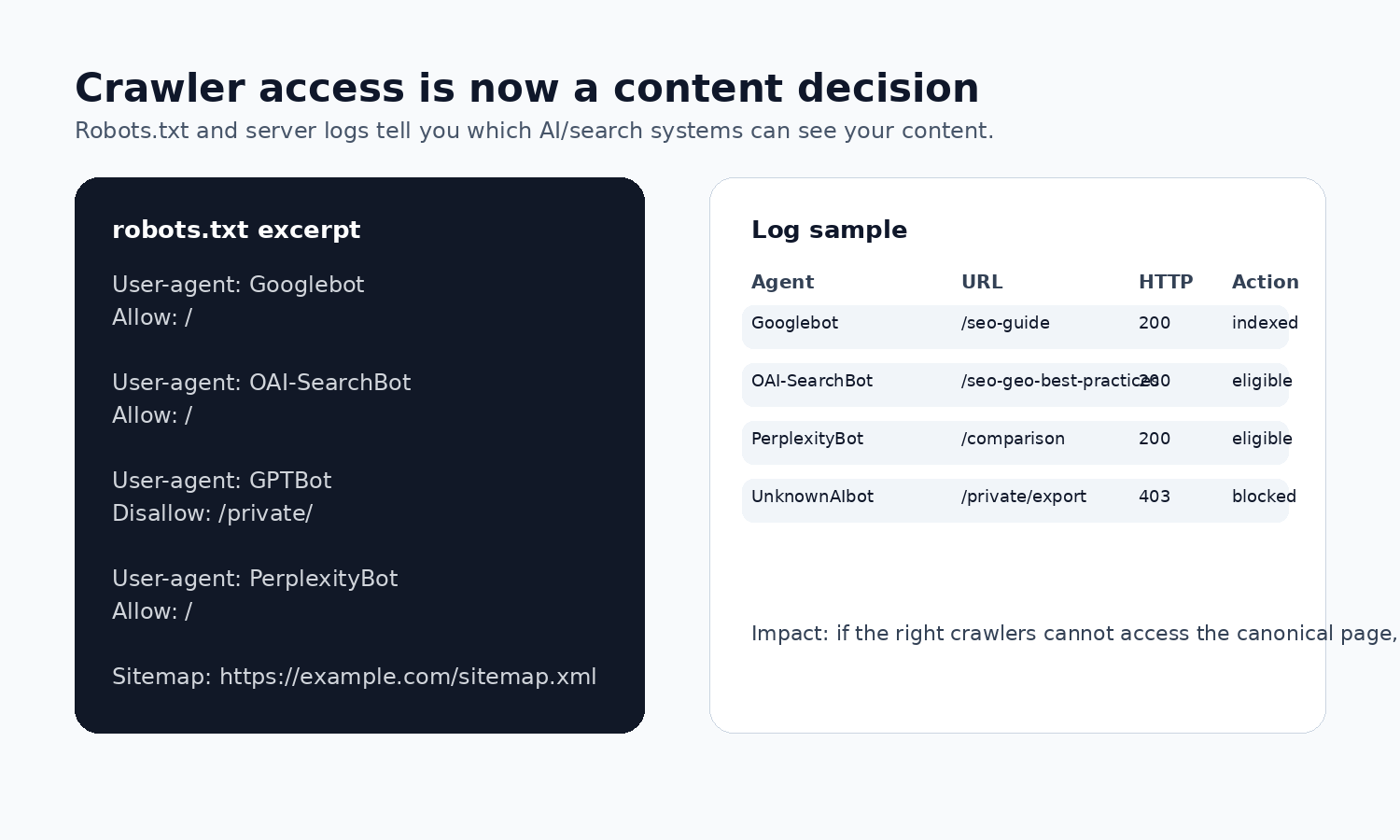
Blocking every AI-related crawler may protect content from some uses, but it can also reduce visibility in AI search products. Allowing everything may expose pages you did not intend to promote. Treat this like a publishing decision, not a copy-paste robots.txt snippet from someone on LinkedIn.
6. Keep facts fresh and dated
AI systems can surface old content confidently. That is dangerous when your page covers pricing, licensing, APIs, or product limitations.
Add visible update dates. Keep outdated screenshots labelled. Add "tested with" notes where it matters.
Example:
Tested with Microsoft 365 admin center in July 2026. Menu labels may differ between tenants and release rings.
Dates help humans judge reliability. They also give answer systems context when several sources disagree, especially around pricing, licensing, and UI labels.
Practical SEO checklist
Use this before worrying about GEO:
| Area | Check | Why it matters |
|---|---|---|
| Crawlability | Page returns 200, is not blocked, appears in sitemap |
Search and AI systems need access |
| Canonical | Canonical URL points to the preferred page | Prevents diluted signals and wrong citations |
| Intent | One page answers one clear search intent | Improves relevance and internal linking |
| Title and meta | Title is specific, meta description explains the value | Helps CTR and snippet quality |
| Helpful content | Page answers the query with examples and caveats | Thin content is easy to ignore |
| Internal links | Hub and support pages link to each other | Builds topical authority |
| Structured data | Schema matches visible content | Gives machines a cleaner interpretation |
| Performance | Core pages load quickly on mobile | Slow pages lose users and crawl efficiency |
Practical GEO checklist
Use this after the SEO basics are in place:
| Area | Check | Why it matters |
|---|---|---|
| Direct answer | Key sections start with a concise answer | Easier extraction into AI summaries |
| Entities | Products, tools, people, dates, and companies are named | Reduces ambiguity |
| Evidence | Claims have screenshots, examples, tables, or official links | Increases citation value |
| Source clarity | Author, date, canonical URL, and publisher are visible | Supports trust and attribution |
| Follow-ups | FAQ or subheadings answer conversational questions | Matches AI query patterns |
| Freshness | Pages show update dates and tested versions | Prevents stale advice from looking current |
| Access policy | AI/search crawlers are allowed or blocked intentionally | Controls visibility and risk |
| Measurement | Track branded mentions, referral traffic, and cited pages | GEO needs different metrics than ranking alone |
How I would measure this on a small technical blog
This part is still messy. I would not pretend otherwise.
For my own Ghost blog, I would start with a baseline before trying to measure GEO. Google Search Console is not the useful source for me right now, so I use the data I can actually verify. In this case that is Bing Webmaster Tools.
Not because Bing is the whole market. It is not. But it gives me a current view of two things I care about: normal search performance and AI citations. That is enough to stop guessing.
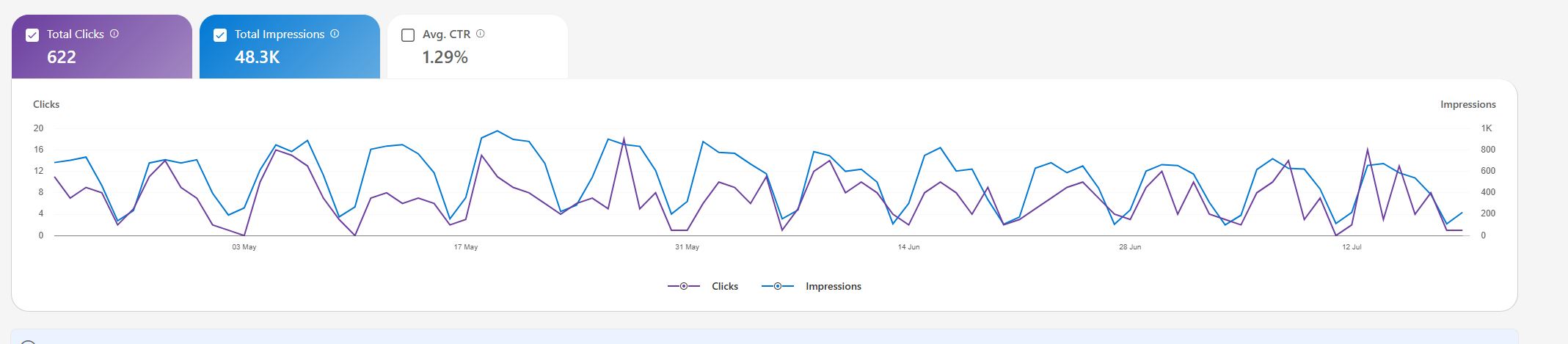
The first screenshot tells me whether the classic SEO layer works at all. Are pages getting impressions? Do people click? Is the CTR weak enough that titles and snippets need work? Simple questions, but useful ones.
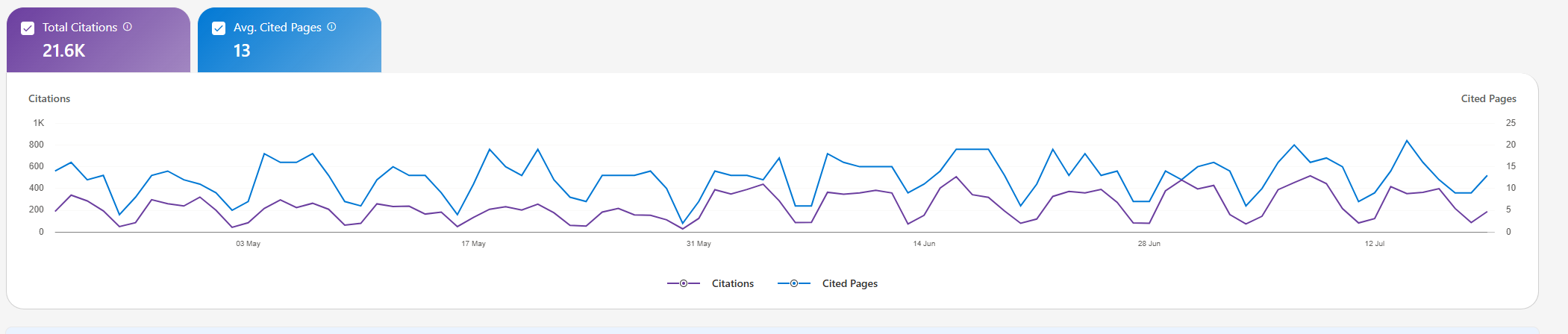
The second screenshot is more interesting for GEO. It shows whether the content is already being used as citation material. I would not read too much into one snapshot, but I would keep it. Without a baseline, every later improvement is just a feeling.
So, my measurement flow would be quite simple:
- use Bing Webmaster Tools for the current search and AI citation baseline
- track which pages get impressions but not enough clicks
- check which pages become cited in AI answers
- refresh titles, internal links, dates, and answer blocks on the pages that already show signals
- repeat the same check monthly instead of changing ten things every day
For the GEO side, I would still add manual checks. Once a month, ask the same questions in Perplexity, ChatGPT Search, Copilot, and Gemini. Then write down which sources are cited and whether my page appears.
This is not perfect measurement. Perfect measurement does not exist here yet. But a consistent baseline is better than pretending that AI answers behave like classic rankings.
A concrete before-and-after example
Imagine a page targeting "best document signing option for Microsoft 365".
Weak SEO/GEO version:
There are many electronic signature solutions available today. Choosing the right one depends on your business requirements. Microsoft, Adobe, and DocuSign all offer useful capabilities.
Better version:
For organizations already standardized on Microsoft 365, Microsoft 365 eSignature is worth checking first because it keeps signing workflows close to SharePoint and the Microsoft admin model. Adobe Acrobat Sign and DocuSign are stronger when you need mature external workflows, broader integrations, or advanced agreement lifecycle features. The best choice depends on licensing, compliance requirements, recipient experience, and whether signatures should stay inside Microsoft 365.
Then add:
- a comparison table
- screenshots of the Microsoft 365 admin setup
- a licensing note with date
- links to official Microsoft, Adobe, and DocuSign docs
- a short FAQ: "Is Microsoft 365 eSignature included in E3?", "Can external recipients sign?", "Where are audit trails stored?"
The improved version can rank in search, work as a comparison snippet, and give AI tools a clear, balanced answer to cite. The weak version mostly says: "there are options". That is not wrong, but it is not useful either.
Why GEO is worth doing
GEO is worth doing because search behavior is changing faster than most content teams admit. Users still click links, but they also ask AI systems for summaries, comparisons, recommendations, and troubleshooting steps. If your content only works as a blue link, you are betting that the old journey stays dominant.
That is the part I actually like about GEO: the non-spammy version forces you to write clearer pages. Direct answers, better structure, visible dates, and real examples help humans first. The machines just benefit from the cleanup.
The bad version of GEO will be spammy: pages stuffed with fake FAQs, keyword variants, and robotic definitions written for bots. That will age badly.
The useful version is more honest: make expert content easier to verify, quote, and trust. If a page cannot survive that standard, the problem is probably not the algorithm.
My take
My take is simple: I would not build a separate GEO strategy before fixing the boring SEO base. Crawl the page. Answer the question early. Show evidence. Name the systems. Keep dates visible. Then check whether AI search tools can cite the page without turning it into nonsense.
That is not magic. It is just better technical writing.
Sources worth reading
- Google Search Central: SEO Starter Guide
- Google Search Central: Creating helpful, reliable, people-first content
- Google Search Central: Introduction to structured data
- Google Search Central: AI features and your website
- OpenAI Platform docs: Overview of OpenAI crawlers
- Perplexity docs: Perplexity crawlers