Passwords, MFA, and Passwordless in 2026: What I’d Actually Do
If you work in IT long enough, you’ll see the same sentence in different slides over and over again:
“Passwords are dead.”
They’re not. They’re just no longer enough on their own.
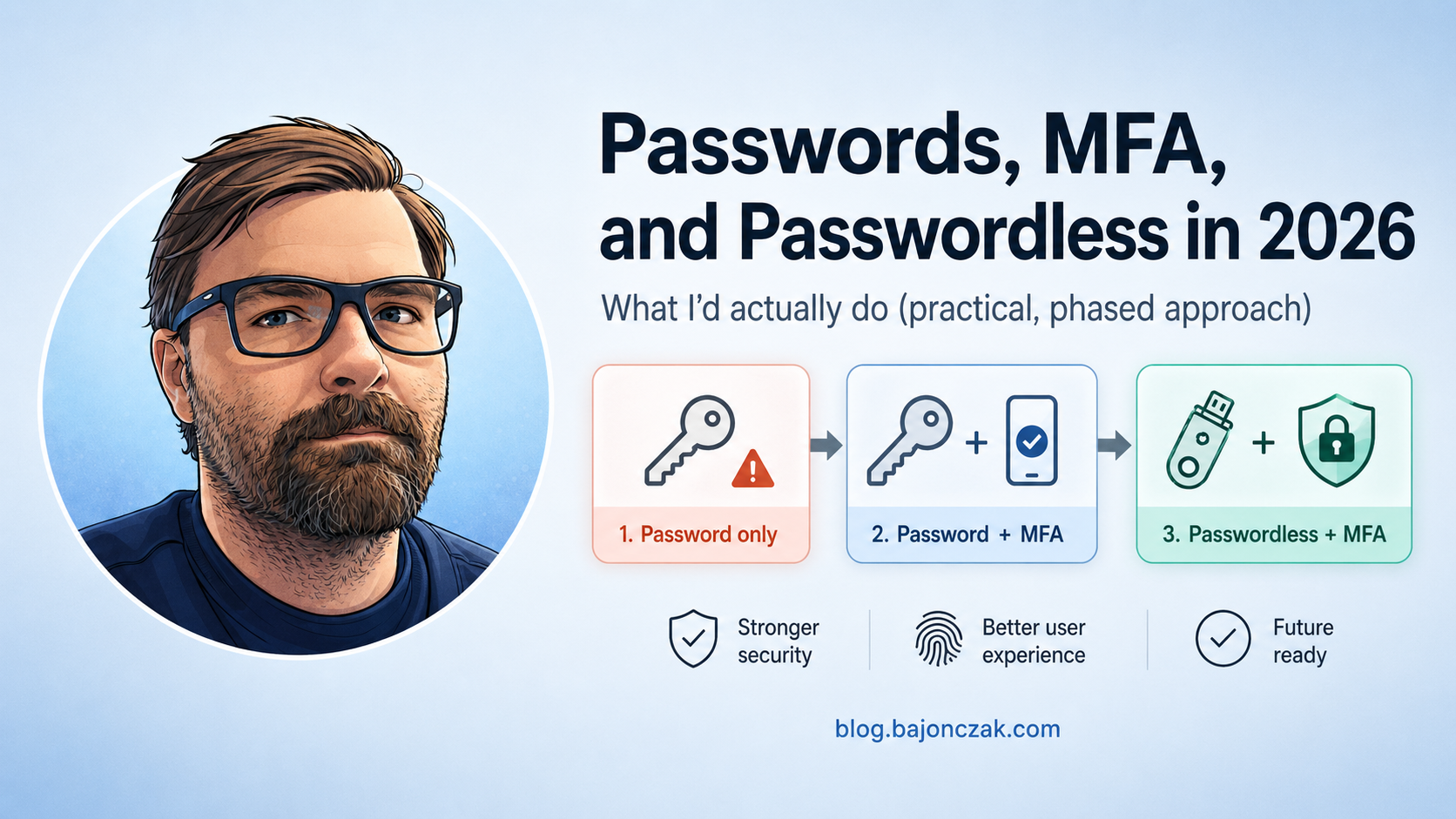
In this post I want to walk through how I look at three login setups in 2026:
- password only,
- password + MFA,
- passwordless + MFA.
And more importantly, where each of them is still acceptable, where it’s no longer good enough, and what I’d do in a normal Microsoft‑centric environment to move things in the right direction without declaring a 5‑year identity transformation project.
Why password-only login is fundamentally broken
On paper, password-only login still “works”:
- user types username + password,
- system checks hash,
- access granted.
The problem is that in 2026, almost all of the assumptions behind this model are gone:
- people reuse passwords across services,
- password leaks + credential stuffing are a permanent background noise,
- phishing kits and malware have industrialised credential theft.
If an attacker gets hold of your password, that’s it. There is no second barrier.
In practical terms, I treat password-only login like this:
- OK for low-risk personal stuff that doesn’t matter if it pops (test accounts, throwaway services).
- NOT OK for anything that touches company data, email, files, HR or finance.
For corporate environments, password-only login is basically “anonymous plus liability”.
Why password + MFA is the current baseline
Adding multi-factor authentication (MFA) closes the biggest gap: a leaked password is no longer a complete account takeover.
In a typical Microsoft / Entra ID setup today, that looks like:
- user enters username + password,
- system checks risk and policies,
- user confirms via push notification, code, FIDO key or similar.
This doesn’t make you bulletproof. It does raise the bar significantly. Attackers now need:
- the password,
- and a way to get past MFA – via prompt bombing, SIM swap, malware on device, real‑time phishing proxies, social engineering, etc.
That’s a lot harder to scale than simple credential stuffing.
For company use, my view is simple:
- password + MFA is the minimum for any serious SaaS / identity / admin / remote access.
- if you can’t or won’t enforce MFA for a system, treat it as untrusted and isolate accordingly.
The details matter though. Not all MFA is equal.
Not all MFA is created equal
Roughly, I think of MFA options in a spectrum:
- weakest: SMS codes (easy to phish, SIM‑swap, intercept),
- better: TOTP apps (authenticator codes),
- better again: push approvals with number matching and clear context,
- best in class: FIDO2 / security keys / platform authenticators.
In an Entra ID world, that translates into:
- avoid SMS where you can,
- prefer Microsoft Authenticator with number matching and login context,
- for admins and high‑risk roles, push hard towards FIDO2 keys or strong device‑bound authenticators.
So if you say “we have MFA”, but it’s mostly SMS to personal phones, you’ve raised the bar a bit, but not as much as you probably think.
Where passwordless + MFA comes in
“Passwordless” is a confusing term because many people hear “less secure”. What it actually means in practice is:
- you remove the reusable password from the primary login flow,
- you replace it with something tied to a device, a key or a strong authenticator,
- you often still have multiple factors – they’re just baked into the flow, not bolted on.
In the Microsoft ecosystem, common passwordless options include:
- Windows Hello for Business (Hello + PIN/biometric bound to the device),
- FIDO2 security keys,
- Microsoft Authenticator passwordless sign‑in.
These are “passwordless” from the user point of view, but still multi‑factor under the hood:
- something you have (device, key),
- something you are or know (biometric, PIN),
- plus device binding and anti‑phishing properties.
This kills an entire class of attacks:
- no password to phish and replay,
- no password database to steal and crack,
- no password reuse across systems.
“Passwordless + MFA” in the real world
In practice, I see a few patterns that work:
- For standard employees:
move to passwordless sign‑in (e.g. Windows Hello for Business + Authenticator) for day‑to‑day, keep a strong password only as a recovery path. - For admins and sensitive roles:
enforce FIDO2 keys or equivalent, with strict Conditional Access and no legacy protocols.
You can still require step‑up MFA for high‑risk actions (e.g. admin portals, financial approvals), but the default login experience no longer revolves around a reusable password.
How I’d phase this in a Microsoft‑centric environment
If I had to move a “normal” enterprise from password‑only sprawl to something sane without breaking everything, I’d think in phases rather than slogans.
Phase 1: kill password‑only for important stuff
First goal: make sure no important system is still password‑only.
Concretely:
- Enforce MFA for Entra ID sign‑ins, at least for browser and modern apps.
- Identify legacy protocols and apps that can’t handle modern MFA and plan their replacement or isolation.
- Upgrade from SMS MFA to app‑based or FIDO where possible.
This phase is about closing the obvious holes.
Phase 2: make MFA usable and consistent
If MFA feels like a random punishment from the sky, people will resist it and fall for fatigue attacks.
So I’d:
- use risk‑based and Conditional Access policies to only prompt when it actually matters,
- standardise on a small set of MFA methods (don’t let every team invent their own),
- explain clearly why MFA is there and how to recognise suspicious prompts.
The goal is to make MFA feel like a normal part of the job, not a random nuisance.
Phase 3: introduce passwordless where it makes sense
Once MFA is the norm and your identity hygiene is improving, you can gradually move to passwordless for the main flows.
For example:
- enable Windows Hello for Business for corporate devices,
- pilot FIDO2 keys with admins and a few friendly power users,
- offer passwordless options in Microsoft Authenticator.
Don’t rip passwords out overnight. Treat them as a recovery path and slowly reduce how often people actually need them.
Where I still accept “just a password”
Even in 2026, I’m not dogmatic. There are places where I still accept password‑only login, but I treat them consciously as low‑trust:
- throwaway accounts for testing or demos,
- services that have no connection to production data or identities,
- temporary lab setups where convenience matters more than security and everything can be nuked easily.
The key is to ensure those islands are genuinely isolated. If you use the same password for “toy lab” and “prod tenant”, you’ve defeated the entire point.
My take
The debate “password vs password + MFA vs passwordless” often sounds more religious than practical.
From where I sit today:
- password‑only is over for anything that matters,
- password + MFA is the pragmatic baseline and will be around for a long time,
- passwordless + MFA (in disguise) is where you want to end up for most users, especially in a Microsoft 365 / Entra world.
The trick is not to chase buzzwords, but to quietly kill off the worst patterns, make MFA normal and then use passwordless to make the remaining security feel less painful and more natural.
If you get that right, you won’t need another “Passwords are dead” slide. People will just stop noticing that they’re not really logging in with passwords anymore.