Calling Custom Code from Microsoft 365 Copilot Studio
Calling Custom Code from Microsoft 365 Copilot Studio
Most Copilot demos stop at the chat experience. That is useful for explaining the interface, but it misses the part where enterprise projects usually get difficult: the moment the agent has to call governed code, evaluate real data, and write the result into another system.
For this post I built a small installable demo repository:
GitHub: SBajonczak/customagentm365demo
The scenario is simple on purpose:
- A user talks to an agent in Microsoft 365 / Copilot Studio.
- Copilot Studio calls a custom HTTPS action.
- The custom code validates the request and analyzes structured records.
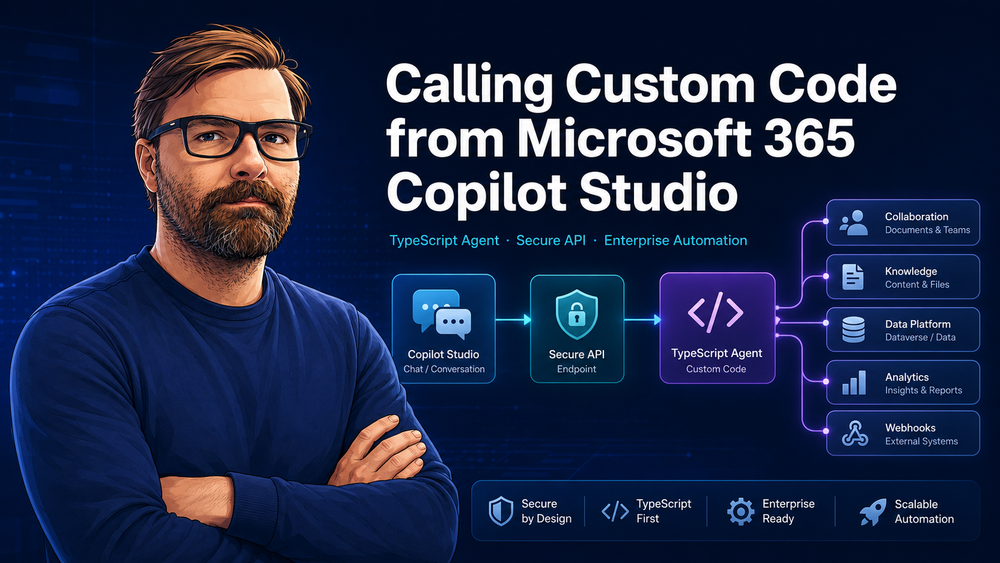
- The result is returned to Copilot Studio and dispatched to configured target environments such as Teams, SharePoint, Microsoft Fabric, Dataverse, or a generic webhook.
That separation matters. Copilot Studio owns the conversation. The custom code owns validation, deterministic business logic, auditability, and downstream writes.
Architecture
The demo uses this shape:
Microsoft 365 chat
      |
      v
Copilot Studio agent / topic
      | HTTPS action with x-api-key
      v
Custom Agent M365 Demo (Fastify + TypeScript)
      | validate + analyze + correlate
      v
Target environments
  - webhook
  - Teams / Power Automate
  - SharePoint / Graph-backed flow
  - Fabric pipeline
  - Dataverse action
The important design choice is that Copilot Studio does not receive broad write access to every target system. It calls one narrow API. That API decides which payloads are valid, which targets are allowed, and what gets sent.
What the custom agent service contains
The repository is a TypeScript/Node.js project with:
- an installable npm package (
package.json); - a
/healthendpoint; - a
POST /agent/invokeendpoint for Copilot Studio; - typed Zod request validation plus TypeScript response models;
- API-key protection through the
x-api-keyheader; - deterministic data analysis code;
- target dispatchers for
webhook,teams,sharepoint,fabric, anddataverse; - unit/API tests;
- Docker support;
- Copilot Studio setup documentation.
The request model is deliberately narrow:
export const AgentRequestSchema = z.object({
  conversation_id: z.string().min(1),
  user_id: z.string().min(1),
  instruction: z.string().min(1),
  data: z.array(z.record(z.unknown())).default([]),
  target_environments: z.array(TargetEnvironmentSchema).min(1),
  correlation_id: z.string().min(1).optional()
});

export type AgentRequest = z.infer<typeof AgentRequestSchema>;
That is the first production lesson: do not let a language model invent arbitrary writes or queries. Give it a small, typed contract.
The endpoint Copilot Studio calls
The core endpoint is short:
app.post('/agent/invoke', async (request, reply) => {
  const parsed = AgentRequestSchema.safeParse(request.body);
  if (!parsed.success) {
    return reply.code(400).send({ detail: 'Invalid request payload' });
  }

  const agentResponse = analyzeRecords(parsed.data);
  const dispatches = [];
  for (const target of parsed.data.target_environments) {
    dispatches.push(await destination.send(target, parsed.data, agentResponse));
  }

  return { ...agentResponse, dispatches };
});
The interesting part is not the number of lines. The interesting part is the boundary:
- input is validated before analysis;
- analysis is deterministic and testable;
- every response has a
conversation_idandcorrelation_id; - dispatching is explicit per target environment;
- missing target configuration is reported as
skipped, not hidden.
Local installation
Clone the repo and run the tests:
git clone https://github.com/SBajonczak/customagentm365demo.git
cd customagentm365demo
npm install
npm test
npm run build
Start the API locally:
export CUSTOM_AGENT_API_KEY='change-me'
npm run dev
Invoke it with a sample payload:
curl -X POST http://localhost:8000/agent/invoke   -H 'content-type: application/json'   -H 'x-api-key: change-me'   -d '{
    "conversation_id": "copilot-chat-1",
    "user_id": "ada@example.com",
    "instruction": "Analyze incident backlog",
    "data": [
      {"id": "INC-1", "status": "open", "severity": "high"},
      {"id": "INC-2", "status": "resolved", "severity": "low"}
    ],
    "target_environments": ["webhook"]
  }'
A typical response looks like this:
{
  "conversation_id": "copilot-chat-1",
  "correlation_id": "...",
  "record_count": 2,
  "status_counts": {
    "open": 1,
    "resolved": 1
  },
  "summary": "Analyzed 2 records and found 1 open item(s).",
  "recommendations": [
    "Prioritize open items before sending the result to downstream systems."
  ],
  "dispatches": [
    {
      "target": "webhook",
      "status": "skipped",
      "detail": "CUSTOM_AGENT_WEBHOOK_URL is not configured"
    }
  ]
}
The skipped dispatch is intentional. It lets you test the agent before wiring it to Teams, SharePoint, Fabric, or Dataverse.
Installing the agent behind HTTPS
Copilot Studio needs an HTTPS endpoint. For a real environment, deploy the container or Node.js app to something like Azure Container Apps, Azure App Service, Azure Functions, or an API Management-backed service.
The demo includes a Dockerfile:
docker build -t customagentm365demo .
docker run --rm -p 8000:8000   -e CUSTOM_AGENT_API_KEY=change-me   customagentm365demo
For target dispatching, configure one URL per environment:
export CUSTOM_AGENT_WEBHOOK_URL='https://example.com/receiver'
export CUSTOM_AGENT_TEAMS_URL='https://example.com/teams-flow'
export CUSTOM_AGENT_SHAREPOINT_URL='https://example.com/sharepoint-flow'
export CUSTOM_AGENT_FABRIC_URL='https://example.com/fabric-pipeline'
export CUSTOM_AGENT_DATAVERSE_URL='https://example.com/dataverse-action'
In Microsoft 365 projects these URLs are often Power Automate flows, Logic Apps, Azure Functions, or API Management endpoints that perform the final write with the correct identity and permissions.
Creating the Copilot Studio agent
In Copilot Studio, the high-level setup is:
- Create a new agent, for example Incident Triage Agent.
- Add a topic or action trigger such as:
Analyze these records and send the result to Teams. - Add an HTTPS action that calls
POST /agent/invoke. - Map the conversation/user context and the business data into the request schema.
- Add the
x-api-keyheader through a connection or environment secret. - Use the API response fields (
summary,recommendations,dispatches) in the final chat answer.
Example request body:
{
  "conversation_id": "${conversation.id}",
  "user_id": "${user.email}",
  "instruction": "Analyze incident backlog and send a short result",
  "data": [
    {"id": "INC-1", "status": "open", "severity": "high"},
    {"id": "INC-2", "status": "resolved", "severity": "low"}
  ],
  "target_environments": ["webhook", "teams"],
  "correlation_id": "optional-correlation-id"
}
The exact UI labels in Copilot Studio can change, but the pattern stays the same: the Copilot agent is the orchestrator, and your code is the governed tool behind an HTTPS action.
Testing the boundary
The repo includes tests for the two areas that tend to break first:
- request validation;
- API behavior and dispatching.
For example, unknown target environments are rejected:
it('rejects unknown target environments', () => {
  const result = AgentRequestSchema.safeParse({
    conversation_id: 'chat-123',
    user_id: 'user@example.com',
    instruction: 'Summarize',
    data: [{ status: 'open' }],
    target_environments: ['ftp']
  });

  expect(result.success).toBe(false);
});
And the endpoint test verifies that a valid request is analyzed and dispatched:
it('analyzes and dispatches a valid request', async () => {
  const sink = new InMemoryDestination();
  const app = buildApp({ destination: sink, expectedApiKey: 'test-key' });

  const response = await app.inject({
    method: 'POST',
    url: '/agent/invoke',
    headers: { 'x-api-key': 'test-key' },
    payload: {
      conversation_id: 'copilot-chat-1',
      user_id: 'ada@example.com',
      instruction: 'Analyze incident backlog',
      data: [{ id: 'INC-1', status: 'open' }],
      target_environments: ['webhook']
    }
  });

  expect(response.statusCode).toBe(200);
});
I would not skip these tests in a real customer project. The chat layer will evolve quickly, prompts will change, and people will add more targets. The API contract is what keeps the system from becoming a pile of hidden side effects.
Production notes
For a real tenant, I would harden this in a few places:
- replace the demo API key with Entra ID authentication or a managed API gateway policy;
- put downstream writes behind least-privilege identities;
- log correlation IDs without logging sensitive business payloads;
- add per-target retry and dead-letter handling;
- use separate environments for development, test, and production;
- add tenant-specific authorization checks before dispatching to Teams, SharePoint, Fabric, or Dataverse;
- keep Copilot prompts away from secrets and write permissions.
The main point is not that every custom agent must be a TypeScript service. The point is that Copilot Studio should call a governed, testable boundary when the conversation needs to touch real business systems.
That is the difference between a nice demo and something I would trust in production.