Building an MCP Server in TypeScript: Reacting to Signals, Querying BI, and Handing Off to a Second Agent
The useful MCP pattern is not “let the model access everything”. It is the opposite: expose a few safe tools, return structured data, and keep the agent away from raw systems.
Most agent demos still start with a chat box. You ask something, the model answers. Fine.
In enterprise systems, the valuable cases often start somewhere else:
- an alert fires,
- a KPI drops,
- a job fails,
- a ticket changes priority,
- a customer escalates.
That is where MCP becomes interesting.
Instead of giving an agent broad access to infrastructure, you expose a small set of tools with stable schemas. The agent can call those tools, but the dangerous parts stay in normal backend code: authentication, authorization, query limits, input validation, logging, and data shaping.
In this example I use TypeScript to build a small MCP-style workflow:
- a revenue drop signal comes in,
- an orchestrator agent asks an MCP server for safe BI numbers,
- the MCP server queries a controlled BI backend,
- a second analyst agent turns the numbers into a short summary and next steps.
The important part is not the demo itself. The important part is the boundary.
What MCP is, in normal language
MCP stands for Model Context Protocol. The simple version:
MCP is a standard way for agents to discover and call tools.
A tool can represent a BI metric, SAP order lookup, ticket query, Teams notification, build pipeline action, or anything else you decide to expose.
If you have built API gateways, ESBs, OData services, REST APIs, or integration layers, this should feel familiar. In the past we normalised system integrations. With MCP we normalise tool capabilities for agents.
The agent should not need to know whether the backend is Fabric, Power BI, SAP, Graph, Azure DevOps, PostgreSQL, or a custom service. It should know:
- this tool exists,
- these inputs are allowed,
- this output shape comes back,
- these errors can happen.
That is the useful mental model. MCP is not a license to expose your whole estate to a model. It is a contract layer between an agent and the systems you already run.
The use case
Imagine a daily revenue KPI check.
One morning a monitoring rule fires:
Revenue today is down more than 12 percent vs. the 7-day average.
A useful automated response should answer a few basic questions:
- How large is the drop?
- Is it concentrated in a region, channel, or product group?
- Is this a data issue, a business issue, or still unclear?
- What should a human check next?
What I do not want is an agent with a generic SQL tool against the warehouse.
That is the difference between a useful automation and a future incident report.
Architecture
The shape is simple:
flowchart LR
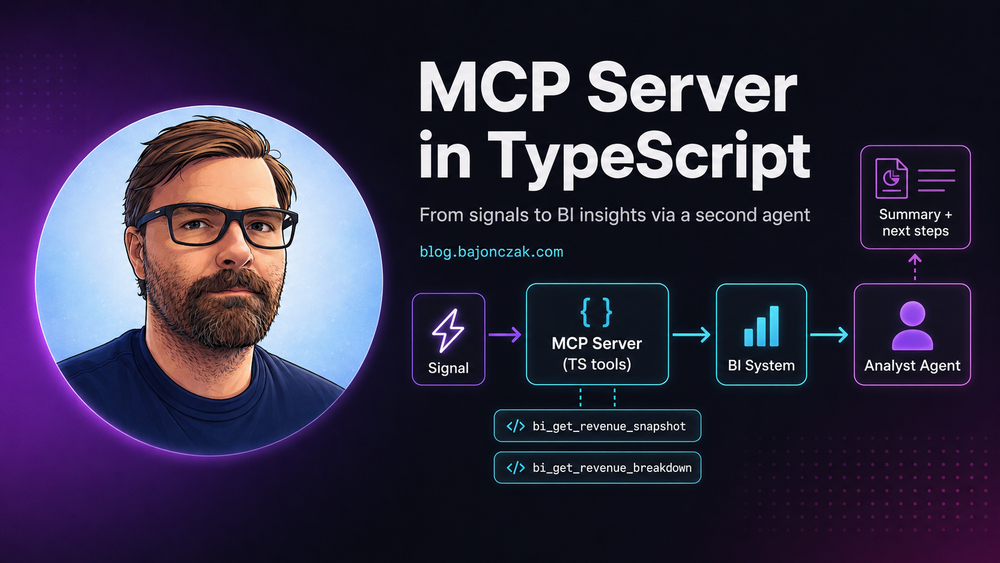
    SIG[Signal event: revenue_drop] --> A1[Agent 1: Orchestrator]
    A1 --> MCP[MCP server: safe BI tools]
    MCP --> BI[BI system / curated metric service]
    A1 --> A2[Agent 2: Analyst]
    A2 --> OUT[Summary and next steps]
The roles are separated on purpose.
| Component | Job | What it must not do |
|---|---|---|
| Signal source | Emit a small event when a KPI crosses a threshold | Decide root cause |
| Agent 1: Orchestrator | Decide which safe tools to call | Query BI directly |
| MCP server | Validate tool inputs, enforce access, call backend code | Accept raw SQL or free-form backend actions |
| BI backend | Return curated metric data | Return more fields than needed |
| Agent 2: Analyst | Explain the provided numbers and propose checks | Invent causes or access systems directly |
Agent 1 receives the signal and decides which tool calls are needed. The MCP server exposes controlled tools like bi_get_revenue_snapshot and bi_get_revenue_breakdown. Agent 2 only receives structured numbers and writes the narrative.
The analyst agent never touches the BI system directly. That one design choice removes a lot of risk.
Contracts first: keep them boring
The contracts are the stable part of the design. Models will change. Prompt syntax will change. Vendor APIs will change. These types should not change every week.
export type RevenueSignalEvent = {
  type: 'revenue_drop';
  tenantId: string;
  user: {
    objectId: string;
    upn: string;
    roles: string[];
    groups: string[];
  };
  occurredAt: string;
  thresholdPct: number;
  metric: 'revenue';
  currency: 'EUR' | 'USD';
  scope: {
    date: string;
    compareDays: number;
  };
};

export type RevenueSnapshot = {
  date: string;
  currency: 'EUR' | 'USD';
  today: number;
  baselineAvg: number;
  deltaAbs: number;
  deltaPct: number;
  quality: {
    isComplete: boolean;
    missingDataReason?: string;
  };
};

export type BreakdownDimension = 'region' | 'channel' | 'productGroup';

export type BreakdownRow = {
  key: string;
  today: number;
  baselineAvg: number;
  deltaAbs: number;
  deltaPct: number;
};

export type RevenueBreakdown = {
  dimension: BreakdownDimension;
  rows: BreakdownRow[];
};

export type AnalystResult = {
  summary: string;
  likelyCategory: 'business_issue' | 'data_issue' | 'unclear';
  nextSteps: string[];
  confidence: 'low' | 'medium' | 'high';
};
Notice what is missing: raw SQL, table names, dynamic filters, or a “query whatever you want” field.
That is deliberate.
TypeScript MCP server shape
The exact SDK can change, but the pattern stays the same:
- define tool input schemas,
- validate inputs server-side,
- enforce tenant and user access,
- call trusted backend code,
- return structured JSON,
- log the call.
A compact version looks like this:
import { z } from 'zod';
import { createMcpServer, ToolContext } from './mcpRuntime';
import { biClient } from './biClient';
import { canReadRevenueMetrics } from './policy';
import { auditToolCall } from './audit';

const DateString = z.string().regex(/^\d{4}-\d{2}-\d{2}$/);

const RevenueSnapshotInput = z.object({
  date: DateString,
  compareDays: z.number().int().min(1).max(30).default(7),
  currency: z.enum(['EUR', 'USD']).default('EUR'),
});

const RevenueBreakdownInput = z.object({
  date: DateString,
  compareDays: z.number().int().min(1).max(30).default(7),
  dimension: z.enum(['region', 'channel', 'productGroup']),
  topN: z.number().int().min(3).max(50).default(10),
  currency: z.enum(['EUR', 'USD']).default('EUR'),
});

async function requireRevenueAccess(ctx: ToolContext) {
  const allowed = await canReadRevenueMetrics({
    tenantId: ctx.tenantId,
    objectId: ctx.user.objectId,
    roles: ctx.user.roles,
    groups: ctx.user.groups,
  });

  if (!allowed) {
    throw Object.assign(new Error('Not allowed to read revenue metrics'), {
      code: 'forbidden',
    });
  }
}

export function buildServer() {
  const server = createMcpServer({
    name: 'bi-insights-mcp',
    version: '1.0.0',
  });

  server.tool({
    name: 'bi_get_revenue_snapshot',
    description: 'Returns today vs baseline revenue snapshot for one tenant and date.',
    inputSchema: RevenueSnapshotInput,
    async handler(input: z.infer<typeof RevenueSnapshotInput>, ctx: ToolContext) {
      await requireRevenueAccess(ctx);

      const output = await biClient.getRevenueSnapshot({
        tenantId: ctx.tenantId,
        ...input,
      });

      await auditToolCall({
        correlationId: ctx.correlationId,
        tenantId: ctx.tenantId,
        userObjectId: ctx.user.objectId,
        tool: 'bi_get_revenue_snapshot',
        input,
        resultMeta: { date: output.date, deltaPct: output.deltaPct },
      });

      return output;
    },
  });

  server.tool({
    name: 'bi_get_revenue_breakdown',
    description: 'Returns revenue breakdown by region, channel, or product group.',
    inputSchema: RevenueBreakdownInput,
    async handler(input: z.infer<typeof RevenueBreakdownInput>, ctx: ToolContext) {
      await requireRevenueAccess(ctx);

      const output = await biClient.getRevenueBreakdown({
        tenantId: ctx.tenantId,
        ...input,
      });

      await auditToolCall({
        correlationId: ctx.correlationId,
        tenantId: ctx.tenantId,
        userObjectId: ctx.user.objectId,
        tool: 'bi_get_revenue_breakdown',
        input,
        resultMeta: { dimension: output.dimension, rows: output.rows.length },
      });

      return output;
    },
  });

  return server;
}
The schema is doing real work here. It limits dates, dimensions, result size, and currency. The handler enforces tenant and role checks before the BI client runs.
Do not push those checks into a prompt. Prompts are for communication and planning. Code is for policy, security, validation, and execution.
BI tool schema
I like documenting tools in a way that a backend engineer, security reviewer, and product owner can all read.
| Tool | Input | Output | Access | Notes |
|---|---|---|---|---|
bi_get_revenue_snapshot |
date, compareDays, currency |
RevenueSnapshot |
Finance analyst or revenue ops role | One tenant only. No raw dimensions. |
bi_get_revenue_breakdown |
date, compareDays, dimension, topN, currency |
RevenueBreakdown |
Same as snapshot | Dimension allow-list only. Max 50 rows. |
Example tool manifest in plain JSON terms:
{
  "name": "bi_get_revenue_breakdown",
  "description": "Returns revenue breakdown by an approved business dimension.",
  "inputSchema": {
    "type": "object",
    "additionalProperties": false,
    "properties": {
      "date": {
        "type": "string",
        "pattern": "^\\d{4}-\\d{2}-\\d{2}$"
      },
      "compareDays": {
        "type": "integer",
        "minimum": 1,
        "maximum": 30,
        "default": 7
      },
      "dimension": {
        "type": "string",
        "enum": ["region", "channel", "productGroup"]
      },
      "topN": {
        "type": "integer",
        "minimum": 3,
        "maximum": 50,
        "default": 10
      },
      "currency": {
        "type": "string",
        "enum": ["EUR", "USD"],
        "default": "EUR"
      }
    },
    "required": ["date", "dimension"]
  }
}
This is also where capability thinking helps. I am not exposing “the BI API”. I am exposing two capabilities:
- get the revenue snapshot,
- get a bounded breakdown for approved dimensions.
Small tools beat giant do_everything endpoints.
Bad tools look like this:
run_sql(query)
call_any_http(url, payload)
query_bi(metric, dimensions, filters, sqlHint)
They feel flexible, but they destroy your security story and make audits almost useless.
BI client: keep SQL behind the tool
For the BI layer, this could be Microsoft Fabric Warehouse, a SQL endpoint, a Power BI dataset API, or a custom internal metric service.
The rule stays the same: do not expose a generic query(sql) tool.
Keep the query in backend code and only allow safe parameters.
import sql from 'mssql';
import { RevenueSnapshot, RevenueBreakdown } from './contracts';

const allowedDimensions = {
  region: 'region_name',
  channel: 'sales_channel',
  productGroup: 'product_group',
} as const;

const pool = new sql.ConnectionPool({
  server: process.env.FABRIC_SQL_HOST!,
  database: process.env.FABRIC_SQL_DB!,
  user: process.env.FABRIC_SQL_USER!,
  password: process.env.FABRIC_SQL_PASSWORD!,
  options: { encrypt: true },
});

async function getPool() {
  if (!pool.connected) await pool.connect();
  return pool;
}

export const biClient = {
  async getRevenueSnapshot(opts: {
    tenantId: string;
    date: string;
    compareDays: number;
    currency: 'EUR' | 'USD';
  }): Promise<RevenueSnapshot> {
    const p = await getPool();
    const req = p.request();

    req.input('tenantId', sql.VarChar(64), opts.tenantId);
    req.input('date', sql.Date, opts.date);
    req.input('compareDays', sql.Int, opts.compareDays);
    req.input('currency', sql.VarChar(3), opts.currency);

    const result = await req.query(`
      WITH baseline AS (
        SELECT AVG(amount) AS baselineAvg
        FROM fact_revenue
        WHERE tenant_id = @tenantId
          AND currency = @currency
          AND [date] >= DATEADD(day, -@compareDays, @date)
          AND [date] < @date
      ),
      today AS (
        SELECT SUM(amount) AS today
        FROM fact_revenue
        WHERE tenant_id = @tenantId
          AND currency = @currency
          AND [date] = @date
      )
      SELECT today.today, baseline.baselineAvg
      FROM today CROSS JOIN baseline;
    `);

    const row = result.recordset[0] ?? {};
    const today = Number(row.today ?? 0);
    const baselineAvg = Number(row.baselineAvg ?? 0);
    const deltaAbs = today - baselineAvg;
    const deltaPct = baselineAvg === 0 ? 0 : (deltaAbs / baselineAvg) * 100;

    return {
      date: opts.date,
      currency: opts.currency,
      today,
      baselineAvg,
      deltaAbs,
      deltaPct,
      quality: { isComplete: true },
    };
  },

  async getRevenueBreakdown(opts: {
    tenantId: string;
    date: string;
    compareDays: number;
    dimension: keyof typeof allowedDimensions;
    topN: number;
    currency: 'EUR' | 'USD';
  }): Promise<RevenueBreakdown> {
    const dimensionColumn = allowedDimensions[opts.dimension];
    if (!dimensionColumn) throw new Error('Unsupported dimension');

    const p = await getPool();
    const req = p.request();

    req.input('tenantId', sql.VarChar(64), opts.tenantId);
    req.input('date', sql.Date, opts.date);
    req.input('compareDays', sql.Int, opts.compareDays);
    req.input('currency', sql.VarChar(3), opts.currency);
    req.input('topN', sql.Int, opts.topN);

    const result = await req.query(`
      WITH today AS (
        SELECT ${dimensionColumn} AS [key], SUM(amount) AS today
        FROM fact_revenue
        WHERE tenant_id = @tenantId
          AND currency = @currency
          AND [date] = @date
        GROUP BY ${dimensionColumn}
      ),
      baseline AS (
        SELECT ${dimensionColumn} AS [key], AVG(daily_amount) AS baselineAvg
        FROM (
          SELECT [date], ${dimensionColumn}, SUM(amount) AS daily_amount
          FROM fact_revenue
          WHERE tenant_id = @tenantId
            AND currency = @currency
            AND [date] >= DATEADD(day, -@compareDays, @date)
            AND [date] < @date
          GROUP BY [date], ${dimensionColumn}
        ) d
        GROUP BY ${dimensionColumn}
      )
      SELECT TOP (@topN)
        COALESCE(today.[key], baseline.[key]) AS [key],
        COALESCE(today.today, 0) AS today,
        COALESCE(baseline.baselineAvg, 0) AS baselineAvg
      FROM today
      FULL OUTER JOIN baseline ON today.[key] = baseline.[key]
      ORDER BY COALESCE(today.today, 0) - COALESCE(baseline.baselineAvg, 0) ASC;
    `);

    return {
      dimension: opts.dimension,
      rows: result.recordset.map((row) => {
        const today = Number(row.today ?? 0);
        const baselineAvg = Number(row.baselineAvg ?? 0);
        const deltaAbs = today - baselineAvg;
        const deltaPct = baselineAvg === 0 ? 0 : (deltaAbs / baselineAvg) * 100;

        return {
          key: String(row.key),
          today,
          baselineAvg,
          deltaAbs,
          deltaPct,
        };
      }),
    };
  },
};
There is one dynamic SQL part here: the dimension column. That only comes from an internal allow-list, never from the model. Everything else is parameterized.
This is not a complete production BI client. The point is the shape: tenant scope, allow-listed dimensions, parameterized values, no raw SQL from the model.
Access control in code
Access control belongs in code, not in prompt instructions like “only show finance data to finance users”.
A minimal policy module could look like this:
type RevenuePolicyInput = {
  tenantId: string;
  objectId: string;
  roles: string[];
  groups: string[];
};

const revenueReaderRoles = new Set([
  'finance-analyst',
  'revenue-ops',
  'tenant-admin',
]);

export async function canReadRevenueMetrics(input: RevenuePolicyInput) {
  if (!input.tenantId) return false;

  const hasRole = input.roles.some((role) => revenueReaderRoles.has(role));
  if (!hasRole) return false;

  // Optional: check group-to-tenant mapping from your IAM or app database.
  return userBelongsToTenant(input.objectId, input.tenantId);
}

async function userBelongsToTenant(objectId: string, tenantId: string) {
  // Replace with your Entra / app DB lookup.
  // The important part: make this a backend decision, not a model decision.
  return Boolean(objectId && tenantId);
}
For sensitive categories I would also add topic and field guards. For example: revenue by region might be fine for one role, but customer-level revenue, compensation, legal matters, investigations, or M&A data may need separate approval paths or no agent access at all.
A model swap should not change your access story. A cheaper model, a faster model, or a locally hosted model may behave differently, but it should never receive data the backend did not authorize.
Agent 1: react to the signal
The orchestrator can be an HTTP endpoint, Service Bus consumer, Event Grid handler, scheduled job, or workflow engine activity.
Here is the HTTP version:
import express from 'express';
import { z } from 'zod';
import { callMcpTool } from './mcpClient';
import { runAnalystAgent } from './secondAgent';

const RevenueSignalEventSchema = z.object({
  type: z.literal('revenue_drop'),
  tenantId: z.string().min(1),
  user: z.object({
    objectId: z.string().min(1),
    upn: z.string().email(),
    roles: z.array(z.string()),
    groups: z.array(z.string()),
  }),
  occurredAt: z.string(),
  thresholdPct: z.number(),
  metric: z.literal('revenue'),
  currency: z.enum(['EUR', 'USD']),
  scope: z.object({
    date: z.string().regex(/^\d{4}-\d{2}-\d{2}$/),
    compareDays: z.number().int().min(1).max(30),
  }),
});

const app = express();
app.use(express.json());

app.post('/signals', async (req, res) => {
  const event = RevenueSignalEventSchema.parse(req.body);
  const correlationId = req.header('x-correlation-id') ?? crypto.randomUUID();
  const { date, compareDays } = event.scope;

  const toolContext = {
    tenantId: event.tenantId,
    user: event.user,
    correlationId,
  };

  const snapshot = await callMcpTool(
    'bi_get_revenue_snapshot',
    { date, compareDays, currency: event.currency },
    toolContext,
  );

  const byRegion = await callMcpTool(
    'bi_get_revenue_breakdown',
    { date, compareDays, dimension: 'region', topN: 10, currency: event.currency },
    toolContext,
  );

  const byChannel = await callMcpTool(
    'bi_get_revenue_breakdown',
    { date, compareDays, dimension: 'channel', topN: 10, currency: event.currency },
    toolContext,
  );

  const analysis = await runAnalystAgent({
    event,
    snapshot,
    breakdowns: [byRegion, byChannel],
  });

  return res.json({ ok: true, correlationId, analysis });
});

app.listen(3000);
In production, I would add authentication on the signal endpoint, idempotency keys, retry limits, dead-letter handling, and structured logs around every tool call.
Without logs, this kind of workflow becomes painful very quickly.
Two-agent handoff
The handoff between the orchestrator and the analyst agent should be data, not vibes.
Agent 2 receives:
- the original event,
- the snapshot,
- the breakdowns,
- a strict output schema.
It does not receive BI credentials. It does not receive SQL. It does not receive an open tool list.
import {
  RevenueSignalEvent,
  RevenueSnapshot,
  RevenueBreakdown,
  AnalystResult,
} from './contracts';
import { llm } from './llmClient';

export async function runAnalystAgent(input: {
  event: RevenueSignalEvent;
  snapshot: RevenueSnapshot;
  breakdowns: RevenueBreakdown[];
}): Promise<AnalystResult> {
  const prompt = `
You are an analyst agent.

Use only the numbers provided.
Do not invent causes.
If the data does not prove a cause, say that it is unclear.
Return a short summary and concrete next steps.

Event:
${JSON.stringify(input.event, null, 2)}

Snapshot:
${JSON.stringify(input.snapshot, null, 2)}

Breakdowns:
${JSON.stringify(input.breakdowns, null, 2)}
`;

  return llm.generateJson({
    schema: {
      type: 'object',
      additionalProperties: false,
      properties: {
        summary: { type: 'string' },
        likelyCategory: {
          type: 'string',
          enum: ['business_issue', 'data_issue', 'unclear'],
        },
        nextSteps: {
          type: 'array',
          items: { type: 'string' },
          minItems: 1,
          maxItems: 6,
        },
        confidence: {
          type: 'string',
          enum: ['low', 'medium', 'high'],
        },
      },
      required: ['summary', 'likelyCategory', 'nextSteps', 'confidence'],
    },
    prompt,
  });
}
A good answer would be something like:
Revenue is down 14 percent vs. the 7-day baseline. The largest negative deltas are in Region West and Direct Sales. The provided data does not prove a root cause. Check order intake, campaign end dates, and whether the pricing or ingestion feed changed overnight.
That is useful. It is also bounded.
Model-agnostic layer: do not make the prompt the program
A common mistake is to put the whole application into the prompt:
- business rules,
- access rules,
- which systems to call,
- which fields are allowed,
- error handling,
- escalation rules.
That works for demos. It becomes fragile when you change models, change pricing tiers, move workloads for data residency, or route simple tasks to a faster model.
A better split is:
| Layer | Stable? | Owns |
|---|---|---|
| Frontend | Replaceable | Chat, Teams, Copilot, web UI, CLI |
| Agent orchestrator | Mostly stable | Planning loop, tool selection, handoff, retries |
| MCP tools | Stable | Schemas, validation, output shaping |
| Policy code | Stable | Authorization, tenant scope, topic guards |
| Backend systems | Stable but evolving | BI, SAP, Graph, ticketing, data platforms |
| Model runtime | Replaceable | Language understanding, summarisation, planning support |
Model-agnostic does not mean model-indifferent. Some tasks need speed. Some need stronger reasoning. Some require data residency. Some may run on a local or private model.
The point is that the model should be a runtime dependency, not the place where your security model lives.
A simple model router can be boring:
type Workload = 'triage' | 'analysis' | 'code' | 'sensitive-summary';

type ModelChoice = {
  provider: 'azure-openai' | 'local' | 'other';
  deployment: string;
};

export function chooseModel(input: {
  workload: Workload;
  sensitivity: 'normal' | 'confidential';
  maxLatencyMs: number;
}): ModelChoice {
  if (input.sensitivity === 'confidential') {
    return { provider: 'azure-openai', deployment: 'private-standard' };
  }

  if (input.workload === 'triage' && input.maxLatencyMs < 1500) {
    return { provider: 'azure-openai', deployment: 'fast-small' };
  }

  return { provider: 'azure-openai', deployment: 'reasoning-large' };
}
The tools, schemas, policies, and audit logs stay the same if you change this routing later.
That is the real benefit.
Where Foundry and MCP fit
In a Microsoft-heavy estate, I would place the pieces like this:
flowchart TD
    C[Copilot / Teams / Web UI] --> O[Agent orchestrator]
    O --> F[Foundry agent runtime if used]
    O --> M[MCP tools]
    M --> APIM[API Management / custom backend]
    APIM --> BI[Fabric / Power BI / SQL]
    APIM --> SAP[SAP / ERP]
    APIM --> GRAPH[Microsoft Graph]
    APIM --> TICKETS[Azure DevOps / Jira / ServiceNow]
My practical take:
- Use Copilot where the work lives inside Microsoft 365: documents, mail, Teams, meetings, SharePoint.
- Use Foundry when you want a managed place to define agents, test variants, connect tools, and observe behavior.
- Use MCP as the tool contract layer between agents and backend capabilities.
- Keep API Management or your own backend in front of systems that need real policy, secrets, throttling, and audit.
MCP and Foundry do not replace your existing APIs, SAP integration layer, Fabric model, Graph permissions, or IAM setup. They sit above those things.
That is why I think integration engineers stay relevant here. The agent does not care whether there is OData, BTP, HANA, Fabric SQL, Graph, or a custom service behind the tool. But somebody still has to design the capability, secure it, shape the data, and operate it.
Testing and operational notes
I would not ship this because a demo produced one nice answer. I would test the boring parts first.
Contract tests
- Invalid dates are rejected.
compareDayscannot exceed the configured maximum.dimensiononly accepts the allow-list.topNis capped.- Extra fields are rejected if your runtime supports strict schemas.
Policy tests
- A user without the finance role gets
forbidden. - A user from tenant A cannot query tenant B.
- Sensitive dimensions require separate approval or are not exposed.
- The policy result is logged without leaking sensitive data.
BI tests
- Queries are parameterized.
- Dynamic column names only come from internal allow-lists.
- Empty baselines do not crash the tool.
- Late or incomplete data sets
quality.isCompletecorrectly. - Result size stays bounded.
Agent tests
- The analyst agent must not claim a root cause when the data only shows correlation.
- The output must match the JSON schema.
- Known incidents can be replayed through the orchestrator.
- Model changes are tested against the same fixture set.
Operations
Add these from day one:
- correlation IDs from signal to tool call to analyst output,
- structured logs for tool name, tenant, caller, latency, and result metadata,
- no raw secrets or full result payloads in logs,
- retry limits and dead-letter handling,
- idempotency for repeated signals,
- dashboards for tool error rate and latency,
- a small registry page that lists each agent, owner, tools, data touched, and escalation path.
The registry does not need to be fancy. A table is better than tribal knowledge.
Example:
| Agent | Owner | Trigger | Tools | Data | Human fallback |
|---|---|---|---|---|---|
| Revenue drop analyst | Revenue Ops | Daily KPI alert | bi_get_revenue_snapshot, bi_get_revenue_breakdown |
Aggregated revenue by tenant | Revenue Ops on-call |
What makes this enterprise-friendly
Three design choices matter most.
First: no raw query tools. The MCP server exposes safe metric tools with strict schemas.
Second: least privilege. The BI credentials should be read-only and scoped to the required dataset or tenant.
Third: separation of responsibilities. The analyst agent does not access BI directly. It only sees the numbers the MCP tool returned.
This is the same pattern I like for SAP, Microsoft 365, Entra, and service desk scenarios. MCP tools should be a narrow capability surface, not a tunnel into every backend system.
My take
Building an MCP server is not interesting because it is new. It is interesting because it forces discipline.
You define the tools. You define the schemas. You decide which backend actions are allowed. You log the calls. You keep the model away from the raw system.
That is the part many agent demos skip.
If I were building this for a real tenant, I would start small: one signal, two BI tools, one analyst output, clear logs. Then I would add more signals only after the boundaries are proven.
The goal is not AI magic. The goal is controlled automation that can reason over the data you intentionally expose, without turning your BI system into a free-form prompt endpoint.