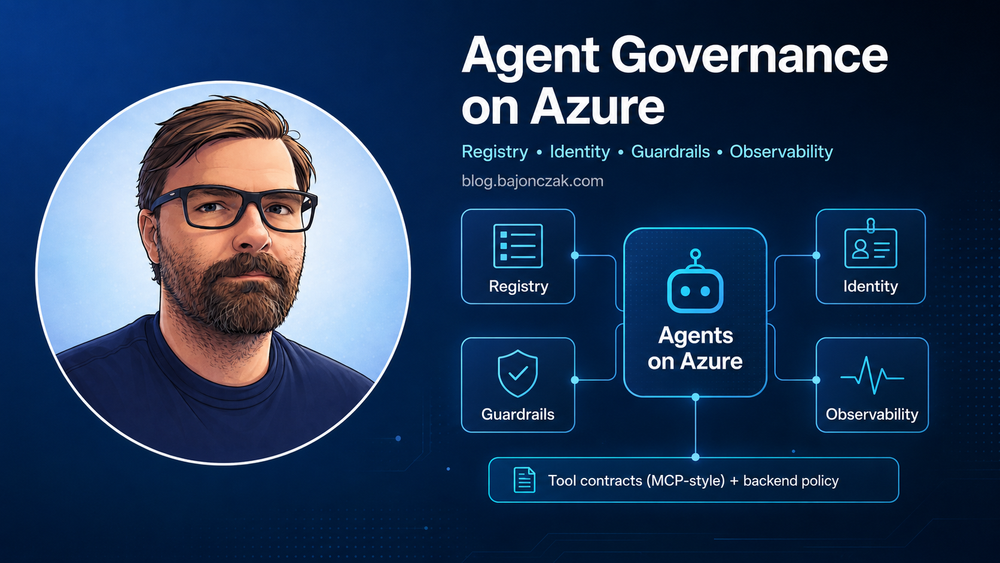
Enterprise Agent Governance on Azure in 2026: Registry, Identity, Guardrails, Observability
My practical view: once agents can call tools and change things, they are no longer a chat feature. They are automation with a blast radius.
Enterprise AI is moving from “Copilot writes a draft” to “agents run parts of a workflow”. That sounds like a small wording change, but it is a very different governance problem.
A text assistant can still create risk. It can summarize the wrong document, draft a bad email, or expose content that was already badly permissioned. But in most Copilot scenarios the user still decides what to send, publish, approve, or change.
An agent that can query systems, open tickets, trigger pipelines, update records, or change configuration sits in another category. At that point, I would govern it more like CI/CD, APIs, service principals, and admin tooling. Not like a chatbot.
The questions I want every organization to answer are simple:
- Which agents exist?
- Who owns them?
- Which identity do they use?
- Which tools can they call?
- Which data can they touch?
- What did they do yesterday?
- Who gets called when something goes wrong?
If those questions are hard to answer, the environment is not ready for broad agent adoption.
Copilot vs agents: what actually changes
A lot of Microsoft 365 Copilot use cases are still read and draft scenarios:
- summarize a document
- draft an email or Teams post
- find “what do we know about X?” across Microsoft 365 content
- help with meeting notes, recaps, and next steps
That is powerful, but it usually stays inside the user’s existing Microsoft 365 boundary. Copilot works with Microsoft Graph, SharePoint, OneDrive, Teams, Exchange, and the permissions already present in the tenant.
The risk profile changes when we move from “Copilot proposes” to “agents act”. Agentic workflows can:
- call tools and APIs
- update systems of record
- start workflows
- create tickets
- run checks across multiple systems
- make decisions based on goals, not just one prompt
That is where governance stops being a nice add-on. If the agent can do real work, the owner, identity, permissions, tool design, approval model, and logs matter more than the model name.
My rule of thumb:
If the problem lives mostly inside Microsoft 365 and is about understanding, structuring, or communicating information, start with Copilot. If the problem crosses systems and can change state, treat it as an agent or automation platform problem.
That distinction helps avoid two common mistakes: pushing Copilot into areas where a proper backend is needed, and building heavy agent infrastructure for a use case that only needs cleaner Microsoft 365 content.
Agent sprawl is the new shadow IT
Most companies will not start with one big agent platform.
They will start with small experiments:
- a Teams bot for HR questions
- an incident helper for DevOps
- a BI agent that explains KPI changes
- a support agent that drafts replies
- a Power Automate flow with an LLM step
- a Copilot Studio agent owned by one department
- an MCP server built by an integration team
- an OpenClaw workflow used by a developer or platform team
Each one looks harmless on its own. Then six months later nobody knows how many agents exist, which credentials they use, which data sources they access, or whether anyone still owns them.
That is the point where agent governance becomes real.
My opinion: treat agents like platform assets from the beginning. Not with a giant approval machine, but with enough structure that IT, security, and the business can still answer basic questions.
Agent 365 vs a customer owned registry
Microsoft is clearly moving toward a more governed agent landscape with concepts like Agent 365: a central place where agents in the Microsoft ecosystem can be registered, managed, monitored, and controlled.
That direction makes sense. A central view is better than “somewhere in Copilot Studio there are three flows and nobody remembers what they do”. Agent 365 can help with questions such as:
- Which Copilot and Microsoft 365 agents exist?
- Who owns them?
- Which policies apply?
- Which workflows are autonomous?
- Which systems and identities are involved?
- What is the potential blast radius?
But I would not make Agent 365 the only source of truth for the whole company.
The reason is simple: not every agent lives inside the Microsoft 365 control plane. Many real setups will also include Foundry, MCP servers, custom backend services, OpenClaw workflows, scripts with LLM steps, and older automations that suddenly get an AI interface.
So I would think about it like this:
- Agent 365: the Microsoft side of the agent landscape. Copilot Studio, Microsoft 365 agents, Copilot visible tools, and the policies Microsoft can enforce there.
- Customer registry: the cross-system source of truth. It includes Microsoft agents, Foundry/MCP agents, OpenClaw workflows, custom services, and any automation that acts with AI assistance.
Agent 365 can feed the customer registry. It can be an important subsystem. But the customer still owns the full map, because the customer owns the risk.
The minimal registry does not need to be a new platform on day one. A table, a YAML file in a repo, or a small internal app is enough if it is maintained and used during reviews.
For each agent I would track at least:
- name and purpose
- owner and contact
- environment
- frontend or entry point
- autonomy level
- identity
- data scope
- read and write capabilities
- approval requirements
- logs and metrics location
- risk level
- review cycle
- fallback path if the agent must be disabled
This is boring. That is exactly why it works.
Ownership roles: who owns what?
Copilot and agent governance should not become a new silo. Most organizations already have the pieces:
- Microsoft 365 and Entra ID admins
- security and compliance owners
- data owners for HR, finance, sales, operations, and other domains
- a platform or architecture function
- application and integration teams
What is often missing is the explicit agreement about who decides what.
For a practical 2026 setup I would name these roles.
Copilot or AI product owner
This person or team owns the business adoption story. They define what Copilot and agents are supposed to help with, prioritize use cases, coordinate enablement, and act as the first escalation point for “can we use AI for this?” questions.
They should not own every technical detail, but they keep the overall direction coherent.
Security and compliance owner
This role owns data classification, regulatory concerns, incident response expectations, and audit requirements.
A good security owner does not just say no. They define where general Copilot is fine, where a specialized agent is needed, where human approval is mandatory, and where the answer is simply “not in scope”.
Data and domain owners
These are the people who know the business systems and the sensitivity of the data. HR, finance, legal, sales, operations, manufacturing, and support all have different risk profiles.
They answer questions like:
- Which systems and sites hold critical data?
- What can a general assistant see?
- What needs a specialized agent?
- Which questions should not be answered at all?
- Which actions require approval from the domain?
Technical platform owner
This is usually a mix of Microsoft 365, Entra ID, infrastructure, integration, and platform engineering.
They turn decisions into tenant settings, identities, RBAC, connector configuration, MCP tool schemas, deployment pipelines, logging, dashboards, and operational runbooks.
Agent owner
Every serious agent needs a named owner. Not “IT”. Not “the AI team”. A person or team that accepts responsibility for the agent’s purpose, access, changes, review cycle, and retirement.
If nobody wants to own an agent, it should not be in production.
Scope and data decisions you cannot dodge
Before building more agents, I would write down a few scope decisions in plain language.
For example:
In 2026, our primary Copilot scope is knowledge work inside Microsoft 365: documents, mails, chats, meeting content, and selected knowledge bases. We do not treat general Copilot as a universal frontend for HR, finance, ERP, security operations, or production infrastructure.
Then define data source rules. A first version could look like this:
- Microsoft 365 content: in scope, but permission cleanup is required.
- Ticketing and knowledge base systems: in scope via approved connectors with proper ACL mapping.
- HR systems: out of scope for general Copilot. Only specialized agents with HR approval.
- Finance and core ERP: out of scope for general Copilot. Curated reports and documents are fine.
- Security operations: propose-only by default. No autonomous containment or changes without a separate design review.
- Public websites and internet sources: only where explicitly configured and labeled.
This does not need to be perfect in the first week. But it needs to exist. Otherwise every team assumes their favorite system is obviously in scope.
Identity: this is where the blast radius lives
Every agent acts under some identity.
For Microsoft 365 productivity scenarios, delegated user permissions often make sense. The agent acts within the user’s context and inherits the user’s access. That fits summarization, drafting, personal search, and many Copilot experiences.
For backend automation, I usually expect a service principal or managed identity. On Azure, managed identity is often the cleaner default because there are no long-lived secrets to rotate manually.
The dangerous pattern is the shared super identity: one “agent-prod” account with broad access because it made the first demo easier. That is how a small agent becomes a big incident.
My baseline rules:
- use managed identities where possible
- avoid shared super identities
- separate identities by environment
- separate identities by risk level
- scope RBAC to the smallest practical resource scope
- prefer read-only before write access
- require a design review before production write access
- remove unused capabilities during quarterly reviews
When someone asks whether an agent can do something, I ask this first:
What identity would it use, and what damage could that identity do?
That question is usually more useful than a long abstract AI safety discussion.
For higher risk agents I also want the registry to show the blast radius in plain language. Not just “Contributor on rg-prod-data”, but “can update records in the curated revenue database” or “can create but not approve access requests”.
Guardrails belong in code
Prompts are not policy.
A system prompt that says “do not leak data” is better than nothing, but it is not a control. Real controls sit in the tool layer, API layer, data layer, and identity layer.
For agent tools I want:
- small named tools
- strict input schemas
- server-side validation
- allowlists for sensitive operations
- explicit approval steps for risky actions
- no generic “run anything” tools in production
- no arbitrary SQL or HTTP tools exposed to a model
- rate limits and circuit breakers
- clear error handling
Good tool design is boring on purpose.
Good:
bi_get_revenue_snapshot(date, compareDays, currency)
Bad:
run_sql(query)
The first tool is governable. The second one is an exfiltration path with a nice name.
The same logic applies to business actions.
Good:
create_access_review_ticket(userId, systemId, reason)
propose_entra_group_change(userId, groupId, justification)
Risky:
update_entra_user(anyPayload)
call_internal_api(method, url, body)
If the backend owns the schema, validation, authorization, and approval flow, the model can help choose a useful action without being trusted with unlimited power.
For Copilot extensions, Graph connectors, plugins, and MCP tools, I would make production rules explicit:
- only the platform team deploys production connectors
- every connector has a data owner sign-off
- every custom tool has a short security design note
- tools that write data require approval rules
- sensitive HR, finance, legal, and security topics use whitelists, not just deny lists
You cannot stop users from asking bad questions. But you can control which data is indexed, which tools exist, and what the backend is willing to do.
Observability: auditors do not care that the model is clever
If an agent makes a bad decision, nobody wants to hear that the model was reasoning. They want to know what happened.
For any serious agent, logs should answer:
- who triggered it
- which agent ran
- which frontend was used
- which tools it called
- which systems were touched
- what changed
- which identity was used
- whether approval happened
- where an error occurred
- whether this happened before
On Azure, I would normally place this in Application Insights and Log Analytics, with dashboards and alerts where they make sense. The exact stack can vary. The log shape matters more than the logo.
For every tool call, log at least:
{
  "correlationId": "7f4f8d0e-8d9e-4a9a-b4b4-example",
  "agentName": "revenue-drop-analyst",
  "agentVersion": "2026.05.3",
  "toolName": "bi_get_revenue_snapshot",
  "frontend": "teams",
  "caller": "pseudonymous-user-id",
  "identity": "mi-agent-revenue-drop-prod",
  "environment": "prod",
  "tenantId": "tenant-a",
  "dataScope": "revenue_kpi_curated",
  "approvalId": null,
  "outcome": "success",
  "durationMs": 420
}
For write actions, add the action type, target system, target record type, approval reference, and before/after identifiers where appropriate. Do not log raw prompts, secrets, confidential documents, or personal data just because logging feels good. Store enough to audit behavior and debug incidents, not enough to create a second data leak.
I would also monitor patterns, not just failures:
- unusual tool-call spikes
- repeated access denials
- new tools used for the first time in production
- agents calling systems outside their normal pattern
- high latency or timeout rates
- many refused or approval-blocked actions
Those signals are often more useful than a monthly screenshot of usage numbers.
Agent Fact Sheet example
A lightweight Agent Fact Sheet is a good starting point. It can live in a repo next to the code or in the registry backing store.
apiVersion: governance.bajonczak.com/v1
kind: AgentFactSheet
metadata:
  name: revenue-drop-analyst
  environment: prod
  version: 2026.05.3
  status: active

ownership:
  ownerTeam: platform-data-team
  businessOwner: finance-analytics
  securityContact: infosec-ai-review@example.com
  supportChannel: teams://agent-support

purpose: >
  Explains daily revenue drops from curated BI metrics and prepares
  investigation notes for finance analysts.

frontends:
  - teams
  - scheduled-job

classification:
  riskLevel: medium
  autonomy: propose-only
  productionWriteAccess: false
  humanApprovalRequiredFor:
    - publishing_external_reports
    - changing_finance_records

identity:
  type: azure-managed-identity
  name: mi-agent-revenue-drop-prod
  rbacScope:
    - /subscriptions/00000000-0000-0000-0000-000000000000/resourceGroups/rg-bi-prod
  blastRadius: >
    Can read curated revenue KPI data. Cannot update finance records,
    raw ERP tables, customer master data, or access control settings.

dataScope:
  allowed:
    - revenue_kpi_curated
    - region_breakdown_curated
    - product_category_curated
  prohibited:
    - individual_salary_data
    - raw_erp_tables
    - customer_personal_data

capabilities:
  read:
    - tool: bi_get_revenue_snapshot
      system: fabric_warehouse_curated_metrics
    - tool: bi_get_region_breakdown
      system: fabric_warehouse_curated_metrics
  write: []
  outOfScope:
    - run_sql
    - update_finance_record
    - send_external_email

guardrails:
  toolAllowlistOnly: true
  maxRowsPerQuery: 500
  promptLogging: false
  rawDocumentLogging: false
  requiresDataOwnerApprovalForNewTools: true

observability:
  applicationInsights: ai-agent-prod
  logAnalyticsWorkspace: law-agent-prod
  dashboard: https://portal.azure.com/example-dashboard
  alertRules:
    - repeated-access-denied
    - unusual-tool-call-volume
    - first-prod-use-of-new-tool

operations:
  reviewCycle: monthly
  lastReviewed: 2026-05-01
  fallbackPath: Disable Teams app registration and managed identity assignment.
  changeProcess: Pull request plus platform and data-owner approval.
This does not have to be perfect. It has to be useful. If an auditor, security engineer, or new team member can understand the agent from this file, the registry is already doing real work.
Operating model without killing momentum
Governance fails when it becomes a giant approval machine. It also fails when everyone can ship anything and call it innovation.
The lighter model I prefer:
- During design: write or update the Agent Fact Sheet.
- During deployment: registry entry required before production.
- For new data sources: data owner sign-off required.
- For new write access: named owner, security review, and approval model required.
- Monthly: review new agents, changed tools, errors, denials, and unusual usage.
- Quarterly: re-check RBAC, identities, owners, and unused capabilities.
- Always: make it easy to disable an agent quickly.
This is not very different from how mature teams already handle cloud permissions and CI/CD pipelines. Agents just make the same discipline more urgent.
Short stack placement: Copilot, Foundry/MCP, OpenClaw
I would not force one tool to do everything.
Copilot
Use Copilot for the Microsoft 365 tenant people already work in: documents, mails, chats, meetings, summaries, drafts, and knowledge work over permissioned M365 content.
Do not treat general Copilot as a direct frontend to every ERP, HR, finance, or infrastructure system.
Foundry and MCP
Use Foundry and MCP when you need serious backend orchestration across systems. This is where carefully designed tools like sap_list_users, entra_list_users, create_ticket, or bi_get_revenue_snapshot make sense.
The agent can plan and explain. The backend owns authentication, authorization, validation, business rules, and logging.
OpenClaw
Use OpenClaw for personal, team-level, or self-hosted automation where you control the infrastructure and accept the risk. It is powerful for developer productivity, local workflows, blog plumbing, small ops tasks, and experiments.
I would not casually place OpenClaw in charge of production SAP, HR, or identity workflows unless the same registry, identity, guardrail, and logging discipline applies.
The placement is simple:
- Copilot for knowledge work inside Microsoft 365.
- Foundry/MCP for governed cross-system enterprise agents.
- OpenClaw for self-hosted automation where the owner understands the blast radius.
Pick the tool that matches the governance level of the problem.
Platform boundaries are getting stricter
Enterprise platforms are becoming more careful about how agents access business APIs, which credentials they use, and where audit trails live. That is not surprising. If third-party agents can act inside core systems, platform owners will demand clearer boundaries.
The architecture lesson is simple: do not build on gray-area access paths.
Use official APIs, clear identities, scoped permissions, explicit approvals, and proper logging. It is less exciting than a demo, but it survives contact with security, legal, and operations.
My take
Agent governance is not one feature you switch on. It is a platform habit.
If agents only draft text, you can start with lightweight rules. Once they call tools or change systems, you need a registry, identity model, code-level guardrails, and auditable logs.
I would start small:
- one customer-owned registry
- one Agent Fact Sheet per serious agent
- managed identities or tightly scoped app identities
- small tools instead of generic access
- Application Insights and Log Analytics for tool-call visibility
- monthly reviews for changes, errors, and access drift
That is enough to move without pretending the risk is gone.
The goal is not to slow every team down. The goal is to make sure that when the company has 5, 20, or 100 agents, someone can still answer the boring questions. Which agents exist? Who owns them? What can they do? What did they do yesterday? And how do we stop them if we need to?