Microsoft Fabric, explained: from shared data to a Terraform-managed analytics platform
Microsoft Fabric is one of those products that is easy to describe badly.
It is not simply “Power BI with a new name”, and it is not just another data lake. Fabric is Microsoft’s SaaS analytics platform for building an end-to-end data workflow: bring data in, store it, transform it, analyse it, visualise it, and increasingly react to events while they are happening.
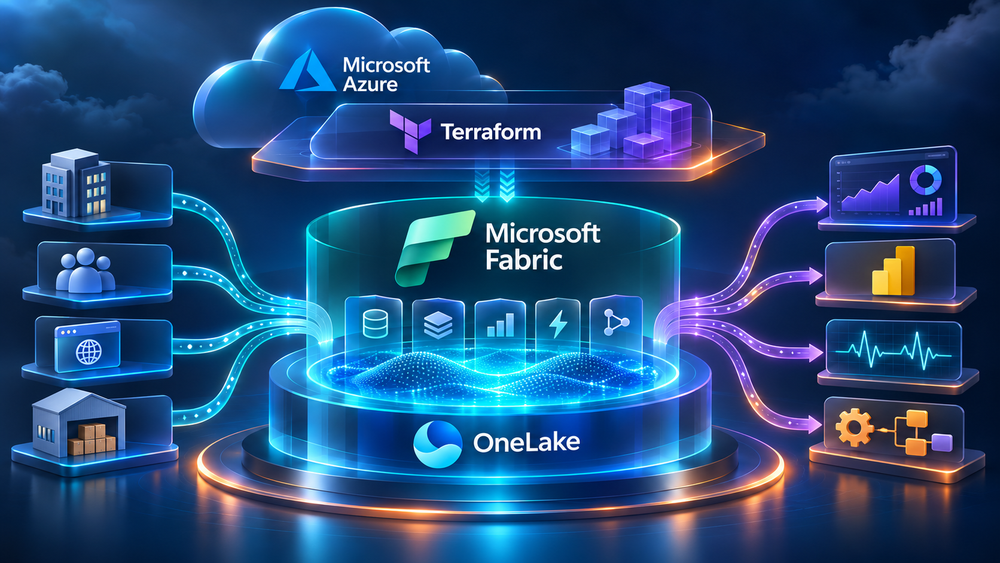
The important idea is that these experiences share a common foundation. Fabric uses OneLake as its logical, tenant-wide data lake and brings together Data Factory, Data Engineering, Data Science, Data Warehouse, Real-Time Intelligence, Databases, and Power BI in one platform. Microsoft describes the platform as a shared compute and storage model rather than a collection of completely separate services.
That sounds convenient, but the real value is architectural: fewer hand-built integrations between services, fewer copies of the same data, and a clearer path from raw events to a business decision.
What is Microsoft Fabric?
At a high level, Microsoft Fabric is a managed analytics platform delivered as software as a service. You work with Fabric items inside workspaces, while Microsoft operates much of the underlying platform infrastructure.
The main experiences are:
- Data Factory for ingestion, orchestration, and data transformation.
- Data Engineering for Spark notebooks, jobs, and large-scale processing.
- Data Warehouse for SQL-based analytical workloads.
- Data Science for experiments, models, and machine learning workflows.
- Real-Time Intelligence for streams, events, Eventhouse, KQL, dashboards, and actions.
- Power BI for semantic models, reports, and business-facing dashboards.
- Databases for operational-style workloads and mirroring into OneLake.
These are different tools, but they are designed to work over the same data estate. OneLake is the connective tissue. Microsoft positions it as a single logical data lake for the organisation, built on Azure Data Lake Storage Gen2 technology but exposed through Fabric’s SaaS experience.
The distinction matters. In a traditional Azure data platform, a team might provision Data Lake Storage, Azure Data Factory, Databricks, Synapse, Power BI, event streaming, identity, networking, and governance as separate building blocks. That approach is flexible, but it also creates integration work and a long list of places where ownership can become unclear.
Fabric does not eliminate those architectural decisions. It packages more of them into a unified platform.
Official overview: What is Microsoft Fabric?
OneLake and the lakehouse idea
The simplest mental model is this:
- OneLake is the shared logical storage layer.
- A workspace is the collaboration and security boundary.
- A lakehouse, warehouse, eventhouse, notebook, pipeline, semantic model, or report is a workload-specific item inside that boundary.
A lakehouse combines file-oriented storage with analytical table structures. In Fabric, Delta Lake is central to this model, which makes it possible to use files, tables, Spark, SQL, and Power BI as parts of one workflow rather than treating every step as a separate export and import operation.
This does not mean every workload should be forced into one giant lakehouse. A good design still separates domains, environments, ownership, and data products. The benefit is that those boundaries can exist inside a common platform and can be governed consistently.
A practical use case: operational sales intelligence
Imagine a company that sells equipment through several channels. It has:
- orders in an ERP system,
- customer and product data in a CRM,
- website clickstream events,
- inventory updates from warehouses,
- and a Power BI dashboard used by sales and operations.
The business wants two things:
- A reliable daily view of revenue, margin, stock, and customer activity.
- Near-real-time visibility when an important order is delayed, cancelled, or likely to miss its delivery promise.
A basic Fabric design could look like this:
- Data Factory copies ERP and CRM data into a bronze area in OneLake.
- Data Engineering notebooks clean and standardise the data into silver tables.
- Curated gold tables hold facts such as orders, order lines, customers, products, and inventory snapshots.
- A semantic model defines reusable business measures such as revenue, margin, fill rate, and late-order rate.
- Power BI exposes the model through management and operational reports.
- Website and logistics events enter Real-Time Intelligence through streaming connectors or an event source.
- KQL queries detect patterns such as an order becoming late while inventory is unavailable.
- A real-time dashboard shows the issue, while an alert or automation can notify the responsible team.
The important part is not the individual dashboard. It is the flow from source data to governed analytical data to an action.
Real-Time Intelligence is intended for data in motion. Microsoft documents it as an end-to-end experience for ingesting, transforming, storing, querying, visualising, and acting on streaming data. It can work with application logs, IoT data, clickstreams, database change data capture, and other event sources.
Official documentation: What is Real-Time Intelligence in Microsoft Fabric?
The architectural split: control plane and data plane
When introducing Terraform, one distinction makes the whole design easier to understand.
The control plane contains relatively stable platform configuration:
- Fabric capacities,
- workspaces,
- workspace identities,
- connections,
- role assignments,
- Git integration,
- domains and platform settings.
The data plane contains the analytical content that changes frequently:
- notebooks,
- lakehouses,
- warehouses,
- semantic models,
- reports,
- pipelines,
- dataflows,
- and the code and configuration used by those items.
Terraform is a natural fit for the control plane. It gives the platform team a repeatable definition, reviewable changes, drift detection, and environment-specific variables.
For the data plane, Terraform can manage some Fabric resources, but it should not automatically become the only deployment mechanism. Fabric’s Git integration and Microsoft’s fabric-cicd tooling are often a better fit for promoting content between development, test, and production. Microsoft’s end-to-end automation tutorial explicitly separates these concerns: Terraform provisions the platform, while Git and fabric-cicd move workspace content.
Official guide: End-to-end automation in Fabric
A minimal Terraform foundation
The Microsoft Fabric Terraform provider is published as microsoft/fabric. Pin the provider version in a real project so that a future provider release does not silently change behaviour in your pipeline.
The current provider documentation recommends Terraform 1.8 or later, with newer versions preferred. Always check the provider registry before starting a new project because resource coverage and recommended versions evolve.
terraform {
  required_version = ">= 1.8, < 2.0"

  required_providers {
    fabric = {
      source  = "microsoft/fabric"
      version = "~> 1.15"
    }
  }
}

provider "fabric" {
  # Authentication is supplied through environment variables.
}
Provider documentation: Microsoft Fabric provider on the Terraform Registry
For local development, Azure CLI authentication is convenient. For CI/CD, use a service principal with federated credentials or another secretless identity pattern where possible. Do not put client secrets directly in .tf files or commit them to Git.
For example, a service-principal-based pipeline can expose values such as these to the Terraform process:
export FABRIC_TENANT_ID="00000000-0000-0000-0000-000000000000"
export FABRIC_CLIENT_ID="00000000-0000-0000-0000-000000000000"
export FABRIC_CLIENT_SECRET="provided-by-your-secret-store"
The Fabric tenant must also allow the service principal to use the relevant Fabric APIs, and the identity needs the correct permissions on the capacity and workspaces it manages. Authentication is not the same as authorisation.
Creating a workspace with Terraform
A workspace is the first useful resource to manage. It gives the environment a name, description, capacity assignment, and optionally a managed identity.
variable "workspace_name" {
  type        = string
  description = "The Fabric workspace display name."
}

variable "capacity_id" {
  type        = string
  description = "The ID of an active Microsoft Fabric capacity."
}

resource "fabric_workspace" "analytics" {
  display_name = var.workspace_name
  description  = "Analytics workspace managed by Terraform"
  capacity_id  = var.capacity_id

  identity = {
    type = "SystemAssigned"
  }
}

output "workspace_id" {
  value = fabric_workspace.analytics.id
}
The provider also supports looking up a capacity by display name in configurations where the capacity already exists:
variable "capacity_name" {
  type = string
}

data "fabric_capacity" "selected" {
  display_name = var.capacity_name
}

resource "fabric_workspace" "operations" {
  display_name = "sales-operations-${terraform.workspace}"
  capacity_id  = data.fabric_capacity.selected.id
}
This approach works well when capacity is managed by a central platform team and workspace creation is delegated to application or data teams.
Environment separation
Do not use one workspace for every stage of delivery. A simple starting point is:
sales-analytics-devsales-analytics-testsales-analytics-prod
The Terraform configuration can stay mostly the same while names, capacity IDs, regions, and identity assignments come from variables or separate state files.
variable "environment" {
  type = string

  validation {
    condition     = contains(["dev", "test", "prod"], var.environment)
    error_message = "environment must be dev, test, or prod."
  }
}

resource "fabric_workspace" "analytics" {
  display_name = "sales-analytics-${var.environment}"
  description  = "Sales analytics ${var.environment} workspace"
  capacity_id  = var.capacity_id
}
Keep Terraform state in a secured remote backend. State can contain resource identifiers and, depending on the resources and configuration, sensitive values. Treat it as production infrastructure data.
A typical workflow is:
terraform fmt -check
terraform init
terraform validate
terraform plan -out=tfplan
terraform apply tfplan
The plan should be reviewed in pull requests or by an approval gate before applying to shared environments.
What Terraform should not hide
Terraform makes provisioning repeatable, but it does not make platform design automatic. Before applying anything, decide:
- Who owns the workspace?
- Which identity runs pipelines?
- Which users and groups receive Admin, Member, Contributor, or Viewer access?
- Which data is allowed to cross environments?
- How are secrets and connections governed?
- What is the retention and recovery strategy?
- How are capacity costs monitored and paused outside working hours?
- Which changes belong in Terraform, and which belong in Git-based content deployment?
Fabric capacities can create ongoing cost, and the Terraform provider documentation calls out capacity lifecycle and sizing as an operational responsibility. A technically correct terraform apply can still be a bad production decision if it creates an oversized capacity and nobody owns the bill.
A sensible first implementation
For a first project, I would keep the scope deliberately small:
- Create one non-production Fabric capacity manually or through the Azure resource workflow.
- Use Terraform to create a development workspace and assign it to that capacity.
- Add a managed identity and a small group-based RBAC model.
- Create one lakehouse and one notebook through Fabric or Git.
- Load a small source dataset through Data Factory.
- Build a curated table and a Power BI semantic model.
- Add a second workspace and promote content through Git or
fabric-cicd. - Add streaming data only after the batch path is observable and understood.
This sequence gives the team a working vertical slice without pretending that every Fabric capability needs to be adopted on day one.
Final thoughts
Microsoft Fabric is best understood as a unified operating model for analytics, not as a single replacement for every Azure data service.
Its strongest idea is the combination of OneLake, integrated workloads, shared governance, and a shorter path from data to insight. Its biggest risk is assuming that the platform removes the need for architecture, identity design, cost control, and deployment discipline.
Terraform fits particularly well around the stable platform layer: capacities, workspaces, identities, connections, and access. Git and Fabric-aware deployment tooling are usually better suited to the fast-changing analytical content inside those workspaces.
Start with one use case, one development workspace, one repeatable deployment path, and one clearly owned data product. That is enough to learn whether Fabric is helping your organisation before you build a much larger platform around it.