Security Trimming with Microsoft 365 Copilot: Asking the Right Data in the Right Context
The more I work with Microsoft 365 Copilot, the less I think about prompts – and the more I think about permissions.
It’s one thing to have an AI that can summarise public docs. It’s a very different thing to plug it into your company’s real data and let people ask whatever they want.
At that point, the question isn’t “Can Copilot answer this?” but:
“Should Copilot answer this – for this user – right now?”
In this post I want to talk about security trimming in the context of M365 Copilot:
- what it actually means,
- where people are currently cutting corners,
- and how I’d implement a practical, generic pattern when you connect external systems like Confluence or custom APIs.
I’ll keep it concrete and code-backed, not just policy talk.
1. Why security trimming is not optional with Copilot
When people roll out Copilot in a hurry, the conversation often sounds like this:
- “Let’s connect it to everything, then we see what happens.”
- “It’s just summarising documents, how bad can it be?”
Pretty bad.
Most organisations have data that:
- only a tiny group should see, or
- should never be mashed together by a generic assistant.
Think of:
- CEO docs: M&A plans, board minutes, confidential strategy decks, early product plans.
- HR data: future layoff lists, performance reviews, salary and bonus details.
- Legal and compliance content: investigations, sensitive contracts, whistleblower reports.
If your Copilot integration ignores permissions, all of that becomes a “nice” answer to:
- “What are our upcoming layoffs?”
- “How much does Person X make?”
- “What legal issues are we currently dealing with?”
That’s not a bug, that’s a breach with extra steps.
So let’s be clear: security trimming is not a nice-to-have in Copilot land, it’s the core of whether you can safely use it on real data at all.
2. What “security trimming” actually means here
In this context, security trimming means:
Every piece of data used to answer a Copilot question must be filtered according to the current user’s identity and permissions.
There are two layers to think about:
- Inside the Microsoft 365 world
When you use Microsoft Graph (SharePoint, OneDrive, Exchange), the platform already understands ACLs and user tokens. If you do it right, security trimming comes “for free”. - Outside Microsoft 365
When you connect external systems like Confluence, Jira, SAP, databases, you are back in DIY land. You need to bring your own security trimming.
Most of the scary stories I see are from the second category.
3. How Copilot + Graph handle permissions by default
On the M365 side, the picture looks roughly like this:
flowchart LR
  U[User] --> C[Copilot]
  C --> P[Plugin / Agent]
  P --> G[Microsoft Graph]
  G --> D[(M365 Data)]

  subgraph M365
    G
    D
  end
When your plugin/agent calls Graph with a delegated user token:
- Graph checks what the user is allowed to see (SharePoint, OneDrive, Teams, mailboxes, etc.).
- You get back only the documents, messages and items that user has access to.
Security trimming happens at the Graph level. That’s good. You still need to be careful which scopes you request, but you’re not manually filtering file lists in your own code.
The problem starts when people think they get the same behaviour automatically for everything else.
4. The dangerous gap: external systems without trimming
As soon as you build your own HTTP connector or call third-party APIs directly from an agent, you can easily sidestep all that nice trimming.
Typical anti-pattern:
- Your Copilot plugin talks to your own backend.
- Your backend calls Confluence/Jira/SQL with a service account that can see everything.
- You return whatever is found, regardless of who asked.
Now imagine a user who normally has no access to CEO documents asking:
- “Show me all upcoming restructuring plans.”
- “What salary bands do we have for senior engineers?”
If your backend happily queries everything with a technical account and returns it to Copilot, you just built a very friendly internal data exfiltration tool.
The key rule is:
Agents and connectors must treat user identity as a first-class input and enforce access checks before they ever touch external data.
5. A practical pattern: passing user context and enforcing ACLs
Let’s look at a simple pattern I like to use for external systems.
High-level flow:

Here the Mermaid code:
flowchart LR
  U[User] --> C[Copilot]
  C --> A[AskExternalData / Agent]
  A --> B[Backend]
  B --> AUTH[Auth / Directory]
  B --> EXT[External System]
  EXT --> B
  B --> C
Important pieces:
- Copilot passes user context to your backend (at least an email or user ID).
- Your backend calls an auth/directory service to resolve permissions (groups, roles, allowed projects).
- Your backend only queries the external system for what the user is allowed to see, or filters results accordingly.
Let’s make that concrete.
5.1. API contract
Define an API where the agent sends the question plus user context:
// Request payload from Copilot plugin
interface AskExternalRequest {
  question: string;
  userEmail: string;
  projectKey?: string;
}

interface AskExternalResponse {
  answer: string;
  sources: { title: string; url: string }[];
  missingInfo: boolean;
}
5.2. Express handler with security trimming hook
// src/secureAsk.ts
import { Request, Response } from 'express';
import { getUserPermissions } from './permissions';
import { searchExternalDocs } from './externalDocs';
import { buildAnswerFromDocs } from './rag';

export async function secureAskHandler(req: Request, res: Response) {
  const body = req.body as AskExternalRequest;

  if (!body.question || !body.userEmail) {
    return res.status(400).json({ error: 'question and userEmail are required' });
  }

  try {
    // 1) Resolve user permissions from your directory/IAM
    const userPerms = await getUserPermissions(body.userEmail);
    if (!userPerms) {
      return res.status(403).json({ error: 'unknown_user' });
    }

    // 2) Search external docs WITH permissions
    const docs = await searchExternalDocs(body.question, userPerms, body.projectKey);

    if (docs.length === 0) {
      const answer = `I couldn't find any documents you have access to that answer "${body.question}".`;
      const response: AskExternalResponse = {
        answer,
        sources: [],
        missingInfo: true
      };
      return res.json(response);
    }

    // 3) Build an answer using an LLM
    const { answer, usedDocs } = await buildAnswerFromDocs(body.question, docs);

    const response: AskExternalResponse = {
      answer,
      sources: usedDocs.map(d => ({ title: d.title, url: d.url })),
      missingInfo: false
    };

    return res.json(response);
  } catch (err) {
    console.error('secureAsk error', err);
    return res.status(500).json({ error: 'internal_error' });
  }
}
5.3. A simple permission model
You can model permissions in many ways. Here’s a very simple example:
// src/permissions.ts
export type UserContext = {
  email: string;
  roles: string[];   // e.g. ['EMPLOYEE', 'HR', 'ENGINEERING_MANAGER']
  groups: string[];  // e.g. ['project-phoenix', 'dept-engineering']
};

// In reality this might talk to Azure AD, Okta, your own directory, ...
export async function getUserPermissions(email: string): Promise<UserContext | null> {
  // Placeholder: load from your IAM
  const entry = await directoryLookup(email);
  if (!entry) return null;

  return {
    email,
    roles: entry.roles,
    groups: entry.groups
  };
}
6. Implementing generic security trimming for external content
For external documents (Confluence pages, database rows, etc.) you need a way to represent who is allowed to see what.
A very generic model:
export type DocumentAcl = {
  allowedRoles?: string[];  // e.g. ['HR', 'CEO']
  allowedGroups?: string[]; // e.g. ['project-phoenix']
};

export type ExternalDoc = {
  id: string;
  title: string;
  url: string;
  content: string;
  acl: DocumentAcl;
};

function hasAccess(doc: ExternalDoc, user: UserContext): boolean {
  const { allowedRoles, allowedGroups } = doc.acl;

  if (!allowedRoles && !allowedGroups) {
    // default: visible to all employees
    return true;
  }

  if (allowedRoles && allowedRoles.some(r => user.roles.includes(r))) {
    return true;
  }

  if (allowedGroups && allowedGroups.some(g => user.groups.includes(g))) {
    return true;
  }

  return false;
}

export function filterDocsByAcl(docs: ExternalDoc[], user: UserContext): ExternalDoc[] {
  return docs.filter(doc => hasAccess(doc, user));
}
Then in your search function:
// src/externalDocs.ts
import { ExternalDoc, filterDocsByAcl } from './acl';
import { UserContext } from './permissions';

export async function searchExternalDocs(query: string, user: UserContext, projectKey?: string): Promise<ExternalDoc[]> {
  // 1) Query the external system (e.g. Confluence, SQL, custom API)
  const rawDocs = await rawSearchDocs(query, projectKey);

  // 2) Apply ACL-based filtering
  const visibleDocs = filterDocsByAcl(rawDocs, user);

  return visibleDocs;
}
High-level, the flow then looks like this:
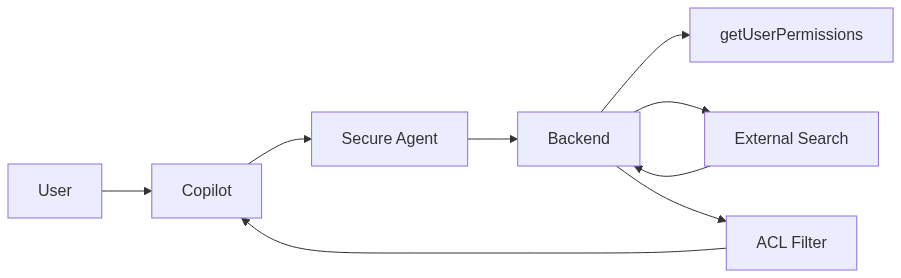
7. Concrete example: secure Confluence connector
Let’s connect this back to Confluence, similar to my previous “Ask the Company” post.
Instead of querying Confluence with a technical account and dumping all results into an LLM, we:
- resolve the user’s allowed spaces or labels,
- limit the Confluence search to those spaces, or
- filter pages after retrieval using ACL metadata.
In a simple setup, you might maintain a mapping like:
// src/projectSpaces.ts
const projectSpaceMap: Record<string, string> = {
  'project-phoenix': 'PHX',
  'project-orion': 'ORI'
};

export function getAllowedSpacesForUser(user: UserContext): string[] {
  const spaces = new Set<string>();

  for (const group of user.groups) {
    const spaceKey = projectSpaceMap[group];
    if (spaceKey) spaces.add(spaceKey);
  }

  // Add global "company" space for all employees if you want
  spaces.add('COMPANY');

  return Array.from(spaces);
}
Then use it in your Confluence search:
import { getAllowedSpacesForUser, UserContext } from './permissions';

export async function searchConfluenceSecure(query: string, user: UserContext): Promise<ConfluencePage[]> {
  const spaces = getAllowedSpacesForUser(user);

  const cqlParts = [`text ~ "${query.replace(/"/g, '\\"')}"`];
  if (spaces.length > 0) {
    const spaceFilter = spaces.map(s => `space = "${s}"`).join(' OR ');
    cqlParts.push(`(${spaceFilter})`);
  }

  const cql = cqlParts.join(' AND ');

  // ... same as before, but using the restricted CQL
}
Now the agent will:
- only search spaces the user is mapped to,
- and won’t “accidentally” surface CEO or HR spaces that live elsewhere.
8. Sensitive data you probably shouldn’t pipe through
Even with good trimming, there are categories of data I’d think twice about running through a general Copilot agent at all:
- individual salary and compensation details,
- future layoff or restructuring plans,
- logs and reports from ongoing investigations,
- deeply personal HR/health information.
A few strategies that help:
- Explicitly exclude certain systems or folders from general-purpose agents.
- Use separate, highly scoped agents for HR or legal, only available to specific roles.
- Be careful with training data if you use logs to improve models – keep sensitive content out of those loops.
Security trimming is not only about “who can read the file”. It’s also about “which AI flows are allowed to touch it and combine it with other information”.
9. Developer checklist before you connect something to Copilot
If I had to put this into a blunt checklist, it would look like this:
- Can I reliably identify the user in my backend (email, ID, token)?
- Do I use delegated permissions where possible, instead of a god‑mode service account?
- Where are permissions for this data actually defined (AD, custom DB, app), and do I check them?
- Are there data classes I should exclude entirely from generic agents?
- Do I log which agent delivered which data to which user, for auditing?
- Is there a simple way to disable or limit an agent quickly if something goes wrong?
10. Closing thoughts: Copilot is only as safe as your connectors
Microsoft 365 and Graph do a lot of the heavy lifting for you on the M365 side. If you stay within that world and use delegated permissions correctly, security trimming works in your favour.
The moment you step outside – Confluence, SAP, custom APIs, databases – you’re back in your usual role: architect, not just user.
For me, the principle is simple:
If I wouldn’t give a human service account read access to all of this without restrictions, I definitely shouldn’t do it for an AI agent either.
Copilot is powerful, but it doesn’t magically know what your company considers sensitive. That’s still your job. Security trimming is the line between “useful internal assistant” and “polite data leak on demand”.