No, Copilot Won’t ‘Just Read SAP’ – Here’s What It Actually Takes
Ever since Microsoft 365 Copilot landed in slide decks, I’ve heard some version of the same sentence in SAP-heavy environments:
“Nice. Then Copilot can just read SAP for us.”
I get where that comes from. The promise is tempting: you have years of business logic and data in SAP, you have Copilot as a smart assistant on the Microsoft side – surely you can just point one at the other and be done?
Reality is a bit more boring and a lot more opinionated.
In this post I want to walk through what Copilot can actually see, what it can’t see, and what it realistically takes to bring SAP data into the picture without creating a security or governance nightmare.
What Copilot sees by default (and why SAP isn’t in that list)
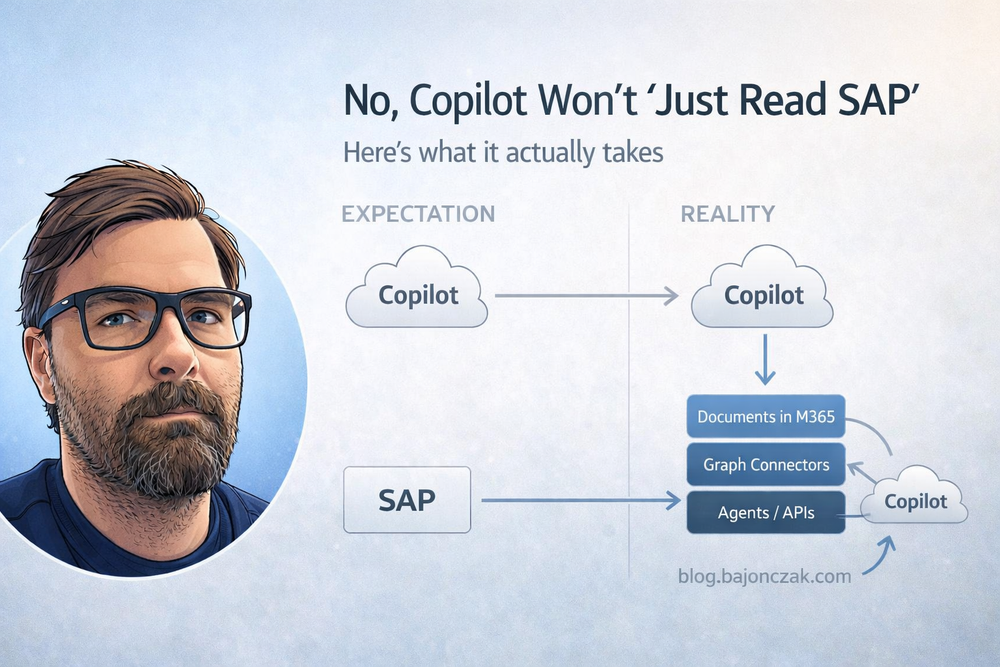
Out of the box, Microsoft 365 Copilot lives in the Microsoft 365 universe. When it fetches context, it calls Microsoft Graph and Graph looks at:
- SharePoint sites and OneDrive files,
- Teams chats and channels,
- Exchange mailboxes,
- and other M365 workloads that are wired into the search index.
SAP is not magically part of that.
If you never integrated SAP content into M365, Copilot has no idea that your SAP HR org structure, your SD orders or your FI postings even exist. It can infer things from documents and emails that talk about SAP data, but it doesn’t “log into SAP” behind your back.
That’s the first mental shift I try to get across:
Copilot is very good at working with the information you already brought into Microsoft 365. It doesn’t magically reach into every line-of-business system in your landscape.
Three realistic paths to bring SAP into the Copilot story
If you want Copilot to answer questions that touch SAP data, there are roughly three families of approaches:
- Move or mirror some SAP output into Microsoft 365 (documents, reports, exports).
- Index SAP-related content via Microsoft Graph connectors.
- Expose SAP via dedicated agents/plugins with a backend you control (e.g. MCP/Foundry, custom APIs).
Each has trade-offs.
1. The pragmatic way: SAP data around Copilot
The lowest-friction path is not to wire Copilot directly to SAP at all, but to make sure the artefacts people already use are properly stored in M365:
- key reports exported from SAP and parked in SharePoint,
- project decks that summarise SAP metrics,
- decision docs that describe what happened and why.
If those documents live in well-structured, permissioned SharePoint sites, Copilot can be genuinely useful without ever “seeing” raw SAP tables. You ask questions like:
- “Summarise the main changes in our SAP SD pipeline in the last two months based on recent reports.”
- “What are the key risks mentioned in the latest SAP FI closing decks?”
For many organisations, this already covers a surprising amount of Copilot value around SAP – and it has an underrated benefit: you keep SAP as the system of record and treat Copilot as a consumer of curated output, not as a random SQL console with a chat UI.
2. Graph connectors: indexing SAP-related content
The next level is using Microsoft Graph connectors to index content from systems around SAP:
- Confluence spaces where SAP processes are documented,
- ticketing systems (incidents, changes, SAP-related requests),
- file shares with legacy SAP documentation.
Technically you can also imagine connectors that expose SAP output via an intermediate store (for example, pushing selected SAP data into an external connection as externalItem objects).
The security model is always the same:
- you push items into an external connection,
- you attach ACLs that say who can see what,
- Graph enforces those ACLs when Copilot searches.
The catch: if you’re lazy with ACLs, you flatten your SAP-related permissions into “Everyone can see everything this connector indexed”. That’s a fast lane to “Copilot tells people things about HR, finance or operations they were never meant to see”.
If you go this route, you have to earn it by doing the boring work:
- decide which SAP data actually belongs in an indexed, text-oriented world,
- map SAP roles/groups to ACLs at indexing time,
- test worst-case queries (“salary”, “restructuring”, “investigation”) before you expose it broadly.
3. Agents and plugins: when you really need live SAP data
For some use cases, read-only documents and indexed content are not enough. You actually want to:
- look up current data in SAP (orders, deliveries, balances, HR records),
- correlate it with Microsoft 365 data (Teams, SharePoint, Entra ID),
- maybe even trigger actions (create tickets, start workflows) based on SAP state.
That’s where dedicated agents or plugins come in.
At a high level, the pattern looks like this:
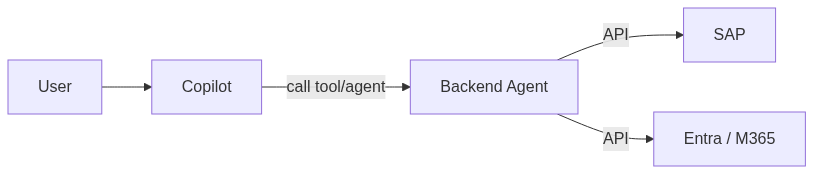
Copilot talks to a backend you own. That backend talks to SAP and Entra/M365 with service credentials, applies your rules, and returns only what the user is allowed to see.
Foundry and MCP are a nice fit here: they give you a structured way to define tools like sap_get_order, sap_list_open_incidents or sap_entra_sync_insights without dumping your entire SAP API surface into a prompt.
The important part: the security model lives entirely in that backend. Microsoft can’t fix it for you.
The security and governance angle you can’t ignore
Every time someone says “Can’t Copilot just read SAP?”, I translate that in my head to:
- “Are we okay with an AI having indirect access to HR, finance and operations data?”
- “If yes, under what rules?”
Some questions I’d insist on answering before building anything serious:
- Which SAP modules are even in scope? FI/CO, SD, HR, CRM… they don’t all have the same risk profile.
- For each module, which questions do we want to support? “Explain my payslip” is a different world from “What are the salary ranges in my department?”.
- Who is allowed to ask which questions? How do we reflect that in SAP roles/Entra groups?
- Where do we want to draw hard red lines – questions that should result in “I’m not allowed to answer that”, no matter what?
On the technical side, I’m very allergic to patterns like:
- using a single technical user with SAP_ALL as the agent account,
- letting the LLM decide freely which SAP APIs to call,
- returning raw table dumps to the model without filtering on user permissions.
Instead, I’d aim for something like:
- Use a dedicated SAP technical user with narrowly scoped roles.
- Always pass the end user’s identity (UPN, objectId) into the backend.
- Map that to SAP authorisations or a separate access table.
- Filter SAP results in code before the LLM sees them.
- Add topic guards for obviously sensitive questions (compensation, layoffs, investigations).
So what does a realistic SAP + Copilot roadmap look like?
If I had to sketch a pragmatic roadmap for bringing SAP into a Copilot world, it would look something like this:
- Get your basics right in M365.
Clean up permissions on the sites and libraries where SAP-related documents live. You don’t want Copilot to be the first time you realise everyone can see the CFO’s “SAP carve-out” deck. - Make better use of documents you already have.
Make sure key SAP reports, decks and decision docs land in well-structured SharePoint areas. Let Copilot summarise, compare and cross-reference those before you touch live SAP data. - Use Graph connectors for surrounding systems.
If you have Confluence, ticketing, or KB systems around SAP, index those properly – with ACLs mapped – so Copilot can answer “how do we…” questions without ever hitting SAP tables. - Start with one focused agent.
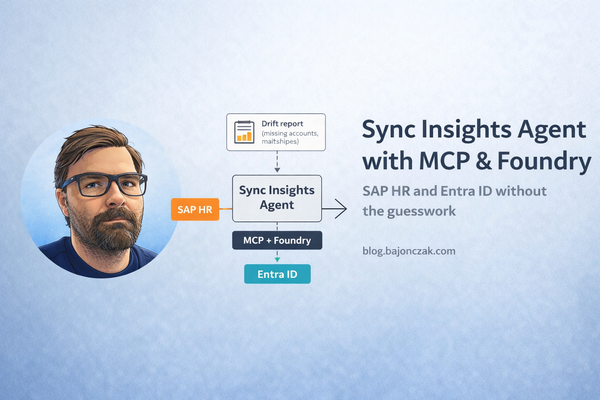
Pick a narrow, high-value use case for a live SAP agent – for example, “Sync insights between SAP HR and Entra ID” or “Explain SAP error messages using our internal KB”. Build one backend, with real security trimming, and prove that it works. - Only then think about broader scenarios.
Once you’ve seen one agent behave well in production, you’ll have a much better sense of how far you actually want to go. In many cases, you’ll find you don’t need “Copilot reads all of SAP”, you need three or four well-designed SAP-aware agents.
My take
“Copilot just reads SAP” sounds nice in a meeting, but it hides all the interesting questions under the rug: which data, for whom, under which rules, and with what blast radius if something goes wrong.
The good news is: you don’t need magic. You need a clear idea of how SAP and Microsoft 365 should work together, and then you pick the right tools:
- native Copilot for the M365 world you already have,
- Graph connectors where search over SAP-related knowledge makes sense,
- and a small set of well-designed agents where live SAP data is really worth the risk.
If you approach it that way, Copilot doesn’t become a mysterious black box “that reads SAP somehow”. It becomes what it should be: a smart layer on top of architectures and security models you actually understand.