From Copilot to Agents: Why Agent Governance Matters More Than Ever
If you’ve followed the latest Copilot news, you’ve probably seen two phrases pop up again and again:
- agentic AI – Copilot and friends doing more than just chat and summarisation,
- Agent 365 and “agent governance” – Microsoft’s attempt to keep that power under control.
Marketing aside, there is a very real problem behind those buzzwords:
Once you let AI agents run workflows on your behalf – not nur Texte schreiben, sondern Dinge tun – musst du sehr genau wissen, wer was darf, wie weit der Blast Radius geht und wer das Ganze am Ende verantwortet.
In this post I want to unpack what “agent governance” means in a Microsoft 365 / Copilot world, how I interpret concepts like Agent 365, and what I would put in place myself before I let Copilot or custom agents do more than just answer questions.
From copilots to agents: what actually changes
Up to now, many Copilot use cases have been fairly contained:
- summarise a document,
- draft an email or a Teams post,
- answer “what do we know about X?” based on M365 content.
Those are powerful, but they’re mostly read and draft scenarios. If something goes wrong, the blast radius is limited: the user still decides what to send, publish or act on.
“Agentic AI” is different. The whole point is that agents can:
- call tools and APIs,
- update systems,
- kick off workflows,
- and do all of that semi‑autonomously based on goals, not single prompts.
In other words: we’re moving from “Copilot proposes” to “agents actually change things”. That’s where agent governance stops being optional.
What Microsoft seems to be aiming for with Agent 365
I’m not going to quote marketing slides here, but if you squint at the current announcements, Agent 365 and similar ideas try to solve a few core problems:
- Central registry: know which agents exist, who owns them and what they can do.
- Blast radius control: define policies around which systems agents can touch and under which conditions.
- Governance hooks: logging, approvals, review flows – so agents don’t become invisible shadow‑IT.
- Model routing: decouple the “agent surface” from the underlying model (OpenAI, Anthropic, Microsoft’s own models, …).
That’s a step in the right direction. But relying purely on whatever Microsoft ships next quarter is not enough. You still need your own view of agent governance, because Microsoft can’t know your risk appetite, your compliance rules or your legacy systems.
Agent governance from the customer side: four dimensions
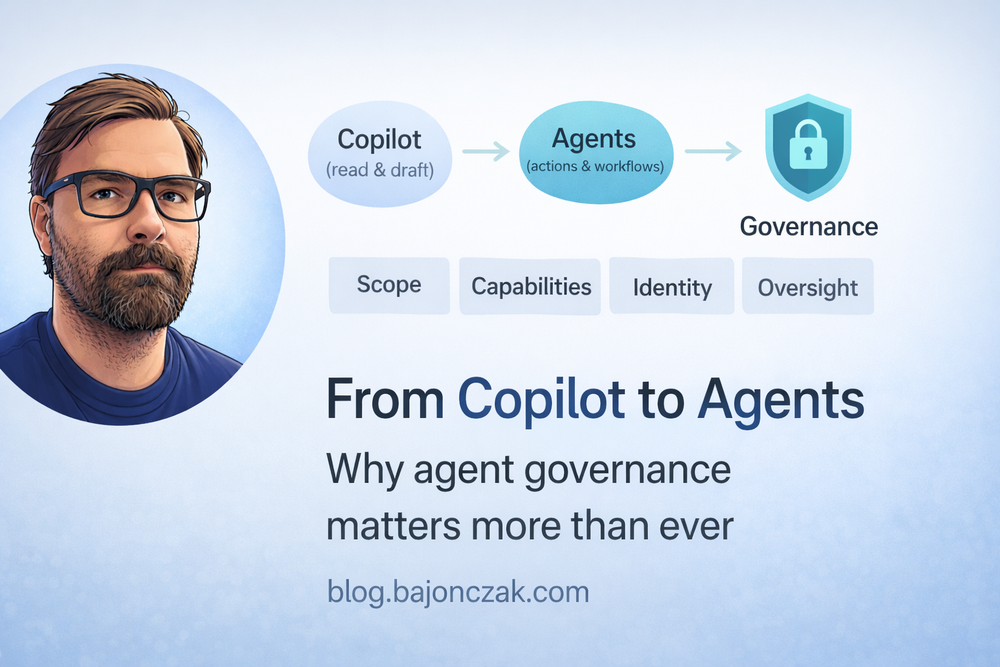
When I think about agent governance in a Copilot/M365 + SAP/line‑of‑business environment, I break it down into four dimensions:
- Scope: what kinds of agents do we allow at all?
- Capabilities: what can a given agent actually do?
- Context & identity: on whose behalf is the agent acting?
- Oversight: how do we monitor and evolve agents over time?
1. Scope: from “Copilot everywhere” to “agents where it makes sense”
Not every problem deserves an agent.
Before you light up agent frameworks everywhere, I’d explicitly decide:
- Where are agents allowed to operate autonomously? (e.g. internal knowledge workflows, ticket triage, dev/test environments)
- Where are agents only allowed to propose actions? (e.g. HR, finance, security operations)
- Where do we not want agents at all? (e.g. very sensitive regulatory flows that require strict human procedures)
Write that down. Otherwise every vendor demo will implicitly expand your scope without anyone noticing.
2. Capabilities: define tools, not magic
An agent without tools is just a fancy autocomplete. An agent with too many tools is a risk.
For each agent, I’d maintain a short, explicit list of capabilities:
- Which systems can it read from?
- Which systems can it write to?
- Which actions are allowed (create, update, delete, approve, escalate)?
- Which actions are explicitly out of scope?
If you use MCP/Foundry, this naturally becomes your tool schema. If you work purely inside Copilot Studio, it should still exist as a document – not just as a bunch of magic connections in a UI.
For agents that talk to SAP, Entra, ticketing or other core systems, I’d be especially strict:
- Small, well‑named tools that map to real, understood operations.
- No “call arbitrary HTTP” tools that can hit anything with a URL.
- No tools that silently bypass existing approval workflows.
3. Context & identity: whose rights does the agent use?
This is the part that gets hand‑waved in many demos.
Every agent needs to act under some identity. There are two common patterns:
- User‑delegated agents: the agent uses the calling user’s permissions.
- Service agents: the agent uses its own service account or app identity.
Both can be valid, but you should be clear which you’re using where:
- For personal productivity (“help me with my docs”), delegated permission is fine and aligns with M365’s normal security trimming.
- For cross‑system workflows (SAP + Entra + ticketing), I often prefer service identities with narrow roles – and explicit mapping from user to allowed actions inside the agent backend.
Either way, someone needs to own the question:
- If this agent goes rogue or is misconfigured, what’s the blast radius of the identity it runs under?
That’s where Agent 365‑artige Konzepte helfen können: ein zentraler Ort, an dem du siehst “diese Agenten laufen mit diesen Identitäten und berühren diese Systeme”. Aber das entbindet dich nicht davon, die Rollen sauber zu modellieren.
4. Oversight: treat agents like living systems
An agent is not a one‑and‑done project. It will behave differently as your data, systems and users change.
Basic oversight I’d want for any serious agent:
- Logging of tool calls: who triggered what, on welches System, mit welchem Resultat.
- Metrics: frequency of use, error rates, long‑running or suspicious patterns.
- Review cycles: someone looks at logs and feedback on a regular cadence (monthly/quarterly).
- Change management: changes to agent capabilities and connections go through review, not random edits in prod.
Foundry, Agent 365 und ähnliche Plattformen können hier viel abnehmen – aber nur, wenn du das Thema bewusst adressierst und nicht als “nice extra” betrachtest.
How this fits into a Copilot + SAP + Entra landscape
Let’s make this less abstract.
Imagine you already have:
- Microsoft 365 Copilot rolled out for knowledge work,
- SAP HR as your people system of record,
- Entra ID as your identity and access front door,
- a few agents (e.g. Sync Insights, ticket triage, documentation helpers).
Agent governance in that world might look like:
- Copilot remains the main assistant inside M365 (documents, mails, chats).
- Critical SAP/Entra data is only exposed to agents via well‑defined tools in your own backend (MCP, Foundry, or similar).
- Agent 365 (or your own registry) tracks which agents exist, who owns them and what tools they have.
- HR and security explicitly sign off on which agents can touch which HR/identity data – and under what conditions (read‑only, propose actions, or actual changes).
The point is not to kill velocity. The point is to make sure that when you have 5, 10, 20 agents in play, you don’t wake up one day and realise nobody knows which one is quietly doing something you never agreed to.
Pragmatic steps I’d take in 2026
If I had to write down a short, realistic “agent governance starter pack” for 2026, it would be:
- Inventory: List the agents you already have or are planning (Copilot Studio flows, Foundry/MCP agents, OpenClaw skills that touch real systems).
- Classify: For each agent, note scope (where it operates), capabilities (read/write, which systems), identity (which account/roles) and owner.
- Set basic rules: Decide where you allow autonomous actions, where only proposals are allowed, and where agents are off‑limits.
- Define an approval path: For new agents and new capabilities, define who has to say “yes” (data owners, security, platform).
- Implement logging and review: Start small – even basic logs and a quarterly review are better than none.
Then, as Agent 365 and similar products mature, you can plug them into this model instead of letting them dictate it.
My take
Agent 365 and the whole “agent governance” story are not just another buzzword layer on top of Copilot. They’re a reflection of a real need: once you give AI agents actual power, you need the same discipline you (ideally) already have for CI/CD, APIs and admin tools.
From a customer’s point of view, I wouldn’t wait for Microsoft or any other vendor to hand me the perfect agent governance solution. I’d:
- define my own scope and risk appetite,
- treat agents as first‑class systems with owners, identities and logs,
- use platforms like Foundry and Agent 365 as implementation details – not as my only source of truth.
If you do that, the next wave of “agentic AI” features in Copilot will be a lot less scary. You’ll have a place to put them in your architecture – and a way to say “yes” or “no” based on more than just a demo.