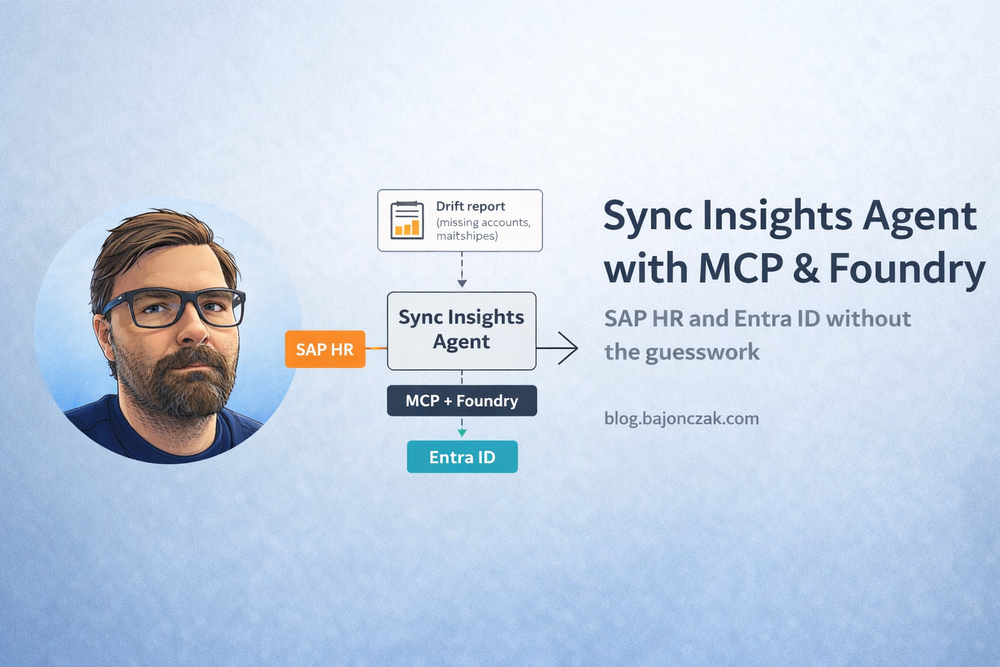
Building a Real Sync Insights Agent with MCP and Foundry (SAP HR + Entra ID)
In most companies I talk to, there is a quiet but important problem sitting between SAP HR and Entra ID:
- Everyone assumes they are roughly in sync.
- Nobody has a simple way to prove it.
People join, leave, change departments, switch roles. SAP (or SuccessFactors) might be the HR source of truth, Entra ID is the front door to your apps, and somewhere in between some kind of sync job tries to keep up.
When you ask “how many users are in SAP but not in Entra?” or “which people have mismatched departments between SAP and Entra?”, the answer is usually a combination of long SQL queries, Excel exports and “we could probably figure it out if you give us a week”.
That’s exactly the kind of problem where an agent makes sense: not because you want AI to automatically fix identities, but because you want a flexible way to ask questions about identity drift – in words, not in SQL.
In this post I’ll walk through how I’d build a real “Sync Insights” agent with MCP and Foundry, using SAP HR and Entra ID as an example.
What the Sync Insights agent should actually do
Before touching any code or MCP schemas, I like to be painfully clear what I expect from this agent.
For a SAP HR ↔ Entra ID scenario, my list looks roughly like this:
- List employees who are active in SAP but missing in Entra (potentially missing accounts).
- List accounts that exist in Entra but not in SAP (potential leavers, service accounts, or shadow identities).
- Highlight attribute mismatches (e.g. department, manager) between SAP and Entra.
- Generate human-readable summaries and CSVs/reports for HR/IT.
And just as important: what it should not do by default:
- It should not auto‑create, disable or change accounts in Entra.
- It should not try to “guess” business rules that belong in your identity governance.
- It should not bypass SAP or Entra security models.
This is an insights agent, not a god‑mode provisioning engine.
The architecture at 10,000 feet
Conceptually, the architecture looks like this:
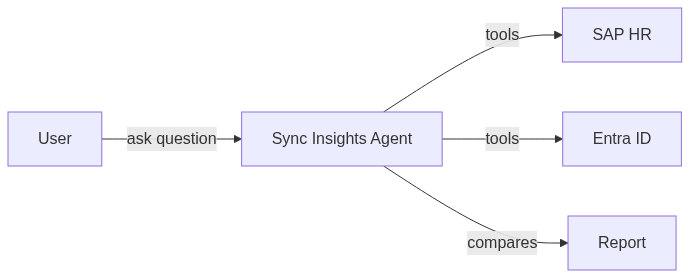
In a Foundry + MCP world, that maps nicely to:
- an MCP server that exposes tools for SAP and Entra access, plus a comparison tool,
- a Foundry project that hosts the MCP server and defines the agent,
- one or more frontends (CLI, web UI, Teams bot, Copilot plugin) that talk to the agent.
The important point: the agent never talks directly to SAP or Entra. It always goes through your MCP server, which lives in your network, uses your credentials and enforces your rules.
Designing the tools: start from questions, not APIs
When people first encounter MCP, they sometimes start by mirroring existing APIs 1:1 as tools. That’s one way to do it, but not the one I prefer here.
Instead, I start from the questions I want to ask and work backwards.
For Sync Insights, the agent needs to be able to:
- fetch a list of users from SAP (with relevant fields),
- fetch a list of users from Entra,
- compare them and return a structured list of mismatches.
In MCP terms, I’d define tools like:
sap_list_usersentra_list_usersreport_mismatches
Each tool has a clear responsibility and a schema that’s friendly to both code and the model.
Example MCP tool schemas (conceptual)
The exact syntax depends on your MCP implementation, but conceptually you want something like:
{
  "name": "sap_list_users",
  "description": "List active employees from SAP HR with key attributes.",
  "parameters": {
    "type": "object",
    "properties": {
      "limit": {
        "type": "integer",
        "description": "Maximum number of users to return.",
        "default": 1000
      }
    }
  },
  "result": {
    "type": "array",
    "items": {
      "type": "object",
      "properties": {
        "userId": { "type": "string" },
        "email": { "type": "string" },
        "department": { "type": "string" },
        "managerId": { "type": "string" },
        "status": { "type": "string", "description": "employment status" }
      },
      "required": ["userId", "status"]
    }
  }
}
{
  "name": "entra_list_users",
  "description": "List Entra ID users with key attributes.",
  "parameters": {
    "type": "object",
    "properties": {
      "limit": {
        "type": "integer",
        "description": "Maximum number of users to return.",
        "default": 1000
      }
    }
  },
  "result": {
    "type": "array",
    "items": {
      "type": "object",
      "properties": {
        "userPrincipalName": { "type": "string" },
        "mail": { "type": "string" },
        "department": { "type": "string" },
        "managerId": { "type": "string" }
      },
      "required": ["userPrincipalName"]
    }
  }
}
{
  "name": "report_mismatches",
  "description": "Compare SAP HR and Entra ID users and return mismatches.",
  "parameters": {
    "type": "object",
    "properties": {
      "includeDepartments": { "type": "boolean", "default": true },
      "includeManagers": { "type": "boolean", "default": true }
    }
  },
  "result": {
    "type": "object",
    "properties": {
      "missingInEntra": { "type": "array", "items": { "type": "object" } },
      "missingInSap": { "type": "array", "items": { "type": "object" } },
      "attributeMismatches": { "type": "array", "items": { "type": "object" } }
    }
  }
}
The point is not the exact JSON. The point is to give the agent tools that match how you naturally think about the problem.
Implementing the backend: keep SAP and Entra logic out of the prompt
Once the tools are defined, you implement them in a backend service that the MCP server wraps.
In TypeScript, that might look like this for the comparison core (simplified – similar to what I showed in a previous post):
type SapUser = {
  userId: string;
  email: string | null;
  department: string | null;
  managerId: string | null;
  status: 'Active' | 'Inactive';
};

type EntraUser = {
  userPrincipalName: string;
  mail: string | null;
  department: string | null;
  managerId: string | null;
};

type SyncMismatch = {
  type: 'MissingInEntra' | 'MissingInSap' | 'AttributeMismatch';
  sapUser?: SapUser;
  entraUser?: EntraUser;
  details: string;
};

function normalizeEmail(email: string | null): string | null {
  return email ? email.trim().toLowerCase() : null;
}

export function computeMismatches(
  sapUsers: SapUser[],
  entraUsers: EntraUser[]
): SyncMismatch[] {
  const mismatches: SyncMismatch[] = [];

  const entraByEmail = new Map();
  const entraByUpn = new Map();

  for (const e of entraUsers) {
    const emailNorm = normalizeEmail(e.mail);
    if (emailNorm) entraByEmail.set(emailNorm, e);
    entraByUpn.set(e.userPrincipalName.toLowerCase(), e);
  }

  // SAP -> Entra
  for (const s of sapUsers) {
    if (s.status !== 'Active') continue;

    const emailNorm = normalizeEmail(s.email);
    let match: EntraUser | undefined;

    if (emailNorm) match = entraByEmail.get(emailNorm);
    if (!match) match = entraByUpn.get(s.userId.toLowerCase());

    if (!match) {
      mismatches.push({
        type: 'MissingInEntra',
        sapUser: s,
        details: `No Entra user for SAP userId=${s.userId}, email=${s.email}`,
      });
      continue;
    }

    const sapDept = (s.department || '').trim();
    const entraDept = (match.department || '').trim();

    if (sapDept && entraDept && sapDept !== entraDept) {
      mismatches.push({
        type: 'AttributeMismatch',
        sapUser: s,
        entraUser: match,
        details: `Department mismatch: SAP="${sapDept}" vs ENTRA="${entraDept}"`,
      });
    }

    const sapMgr = (s.managerId || '').trim().toLowerCase();
    const entraMgr = (match.managerId || '').trim().toLowerCase();

    if (sapMgr && entraMgr && sapMgr !== entraMgr) {
      mismatches.push({
        type: 'AttributeMismatch',
        sapUser: s,
        entraUser: match,
        details: `Manager mismatch: SAP="${sapMgr}" vs ENTRA="${entraMgr}"`,
      });
    }
  }

  // Entra -> SAP
  const sapEmails = new Set(
    sapUsers
      .filter(s => s.status === 'Active')
      .map(s => normalizeEmail(s.email))
      .filter((e): e is string => !!e)
  );

  const sapUserIds = new Set(
    sapUsers
      .filter(s => s.status === 'Active')
      .map(s => s.userId.toLowerCase())
  );

  for (const e of entraUsers) {
    const emailNorm = normalizeEmail(e.mail);
    const upn = e.userPrincipalName.toLowerCase();

    const emailInSap = emailNorm && sapEmails.has(emailNorm);
    const idInSap = sapUserIds.has(upn);

    if (!emailInSap && !idInSap) {
      mismatches.push({
        type: 'MissingInSap',
        entraUser: e,
        details: `No SAP user for Entra UPN=${e.userPrincipalName}, mail=${e.mail}`,
      });
    }
  }

  return mismatches;
}
The MCP server’s report_mismatches tool would:
- Call the internal SAP client to get
SapUser[]. - Call the Entra client to get
EntraUser[]. - Run
computeMismatches. - Return a structured result for the agent (and potentially for CSV export).
The agent never sees raw SAP or Graph APIs. It sees a conceptually clean “report mismatches” tool.
Security trimming and blast radius
Even though this is an “insights” agent, you’re still dealing with identity data. That deserves some respect.
A few guardrails I’d put in from day one:
- Use dedicated technical identities for SAP and Entra, with read‑only permissions limited to the attributes you need.
- Run the MCP server in a controlled environment (e.g. inside your network, behind proper auth).
- Log which tools are called, by which user (or agent) and when – without necessarily storing all data.
- Make it explicit that this agent does not change anything; it only observes and reports.
If you later decide to add remediation (“disable stale accounts”, “trigger tickets”), I’d treat that as a separate phase with its own design and approvals.
Where Foundry helps beyond “just MCP”
Could you host the MCP server yourself and write your own agent wiring? Absolutely.
Where Foundry adds value for me in this setup:
- standardised hosting for the MCP server and agent,
- environment separation (dev/test/prod, tenants),
- central configuration for SAP and Entra endpoints and credentials,
- observability: you can see how often each tool is called, with what latency and error rates.
That’s exactly the kind of stuff that makes a difference when you present this to your identity or security team. It’s much easier to get buy‑in for “an agent running on a managed platform with logging and environments” than for “some Node script that talks to SAP and Graph from under my desk”.
How users would actually interact with this agent
I’ve focused on the backend so far, but the frontend matters if you want people to actually use the thing.
Depending on where your identity and HR teams live, you could expose the Sync Insights agent via:
- a CLI for power users and automation,
- a simple web UI (search, filters, export to CSV),
- a Teams bot or message extension for quick questions (“show me mismatches for department X”).
The nice part is: as long as they all talk to the same Foundry/MCP backend, you don’t duplicate your logic. The tools stay the same; only the UI changes.
My take
Sync between SAP HR and Entra ID is not a new problem. What’s new is that we now have better ways to surface the drift, not just patch over it.
A well‑designed Sync Insights agent with MCP and Foundry doesn’t replace your identity governance or your provisioning engine. It gives you a flexible, inspectable brain on top of them:
- clear tools for SAP and Entra access,
- a repeatable way to compute mismatches,
- a familiar agent interface to ask “what’s out of sync and where?”,
- and a platform that your security and identity people can actually live with.
If you build that first – insights, not magic auto‑fix – you’ll have a much better conversation when someone inevitably asks for “an AI that fixes all our identity problems”. You can point to a concrete agent with real value and say: “We started where it hurts, and where it’s safe.”